使用 JS 脚本
每个表单布局和页面都可以写 JS 脚本。
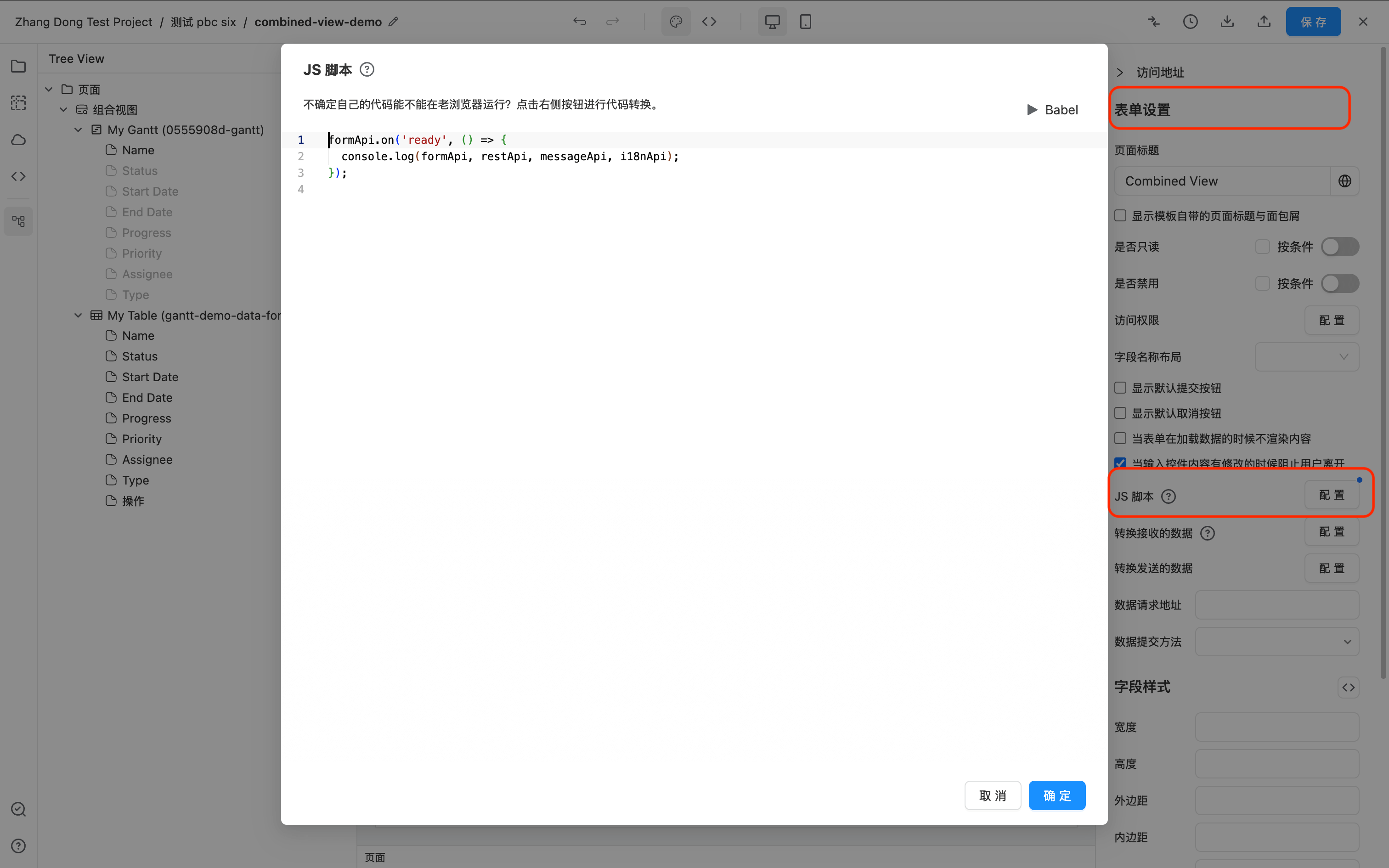
JS 脚本里所有的浏览器 DOM api 均可用,和本地代码写 JS 文件无任何区别。
此外,还提供了 formApi, restApi, messageApi, i18nApi 进行页面的操作数据操作以及发送请求等功能。
console.log(formApi, restApi, messageApi, i18nApi);
formApi.on() 方法可以注册事件。推荐所有代码都放到 ready 事件下,ready 会等待所有的异步组件 api 可用的时候再执行,例如 Table、EChart、Gantt 组件等。
formApi.getFieldApi() 方法可以根据 ID 获取单个组件的接口用以操作组件。
示例
示例1,两个 Table 之间的联动
示例 demo 地址: https://ceta-tutorial.ceta-qa.test.bizops.com.cn/ui/js-demo/page/link-two-tables
示例中 gridApi 表示 Ag-Grid 的所有可用 api, 请参考 https://www.ag-grid.com/javascript-data-grid/grid-api/
- 页面有一个 Input,两个 Table 组件。
- 右侧 Table 配置了 dataFilters 依赖 Input 的值进行性别过滤。
- 示例代码主要实现了了将左侧 Table 选中行的性别自动作为右侧 Table 的过滤条件。
formApi.on('ready', function () {
  const firstTable = formApi.getFieldApi('jsDemoTable1');

  firstTable.gridApi.addEventListener('selectionChanged', function () {
    const rowData = firstTable.gridApi.getSelectedRows()[0];

    if (rowData && rowData.gender && rowData.gender[0] && rowData.gender[0].label) {
      // 将选中行数据的 ID 赋值给表单 id 值为 filterInput 的组件
      // 另一个 Table 的 dataFilters 依赖 filterInput 将会自动刷新
      formApi.setValue('filterInput', rowData.gender[0].label);
    } else {
      formApi.setValue('filterInput', '');
    }
  });
});
示例2,监听 Input 回车事件
示例 demo 地址: https://ceta-tutorial.ceta-qa.test.bizops.com.cn/ui/js-demo/page/input-enter
- 监听 Input 的键盘操作,当输入 Enter 的时候自动触发另一个按钮的点击事件;
- Button 实现的功能是将 Input 的值作为请求的数据发送出去。
formApi.on('ready', function () {
  const inputApi = formApi.getFieldApi('name');
  inputApi.input.addEventListener('keydown', function (event) {
    // 回车键触发 sendButton 的点击
    if (event.key === 'Enter') {
      event.stopPropagation();
      const button = formApi.getFieldApi('sendButton').node;
      button.click();
    }
  });
});
示例3,Chart 与表格之间的联动
示例 demo 地址: https://ceta-tutorial.ceta-qa.test.bizops.com.cn/ui/js-demo/page/chart-drill-down
ECharts 的 api 请参考 https://echarts.apache.org/zh/api.html
- 实现 Chart 数据和 Table 数据的联动;
- 监听 Chart 的点击事件,将点击的 data.productCategory id 值为 hiddenCategoryValue 的数据;
- Table 的 dataFilter 依赖 hiddenCategoryValue 自动刷新。
formApi.on('ready', function () {
  const theChart = formApi.getFieldApi('productPieChart');

  // 监听 Chart 点击事件,将点击的 data.productCategory id 值为 hiddenCategoryValue 的数据
  // 下方 Table 的 dataFilters 依赖 hiddenCategoryValue 的值的话,Table 的数据会自动刷新
  theChart.chart.on('click', function (params) {
    const data = params.data;
    const category = data && data.productCategory;

    // 页面并没有一个 hiddenCategoryValue 的组件。formApi.setValue 可以自己随意存数据。
    formApi.setValue('hiddenCategoryValue', category);
  });
});
示例4,Table 自定义导出
示例 demo 地址: https://ceta-tutorial.ceta-qa.test.bizops.com.cn/ui/js-demo/page/table-custom-export
不用 Table 自带的导出功能,实现往第三方 API 发送请求,带出 Table 的 filterModel 和 searchText 等
第一步,在 Button 的设置界面,做如下图设置。调用 JS 代码的设置是选择 调用表单函数,在 方法名 字段填写 customExport。

第二步,在 JS 脚本里注册 customExport 方法。
formApi.registerMethod('customExport', function () {
  const theTable = formApi.getFieldApi('myTable');
  const tableState = theTable.getTableState();
  const filterModel = tableState.filterModel;

  restApi
    .post('/api/***', { filterModel })
    .then(function () {
      messageApi.success('导出成功');
    })
    .catch(function () {
      messageApi.error(
        '因为没有 api 所以提示导出失败,但是 JS 功能已经实现了,请查看 Network 的请求 Payload 已经把 Table 的 filterModel 发送出去了。',
      );
    });
});
示例5,点击 Button 执行任意 JS
示例 demo 地址:https://ceta-tutorial.ceta-qa.test.bizops.com.cn/ui/js-demo/page/button-call-js
第一步,在 Button 的设置界面,做如下图设置。调用 JS 代码的设置是选择 调用表单函数,在 方法名 字段填写 doMethod。
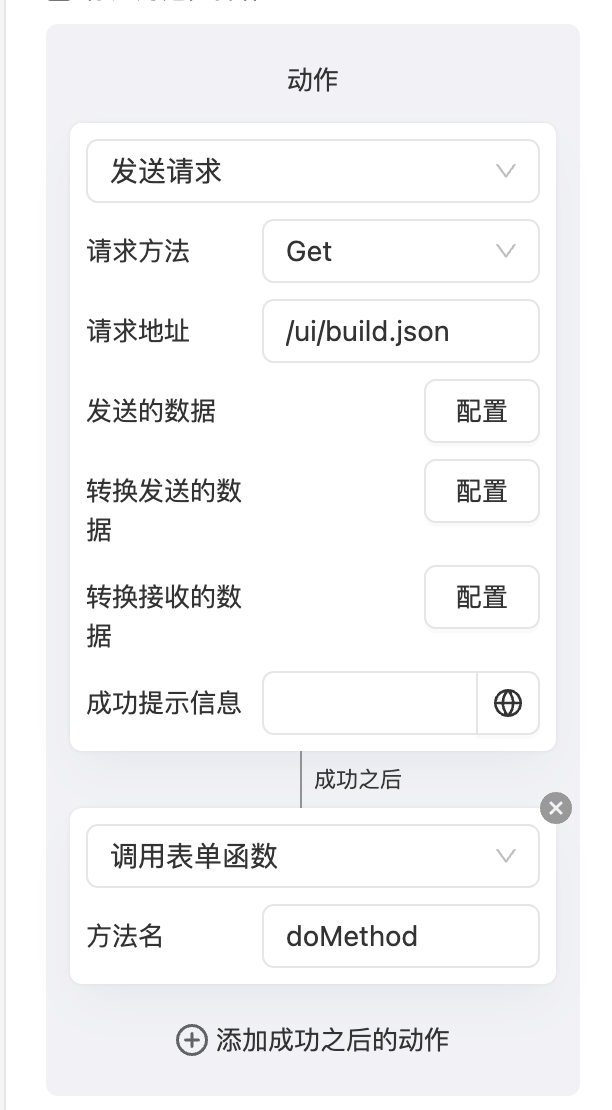
第二步,在 JS 脚本里注册 doMethod 方法。
formApi.registerMethod('doMethod', (params) => {
  return new Promise((resolve) => {
    const { buttonApi, response } = params;

    buttonApi.setLoading(true);

    setTimeout(() => {
      messageApi.success(
        '当前网站前端版本:' + response.BUILD_NUMBER + ',代码编译时间:' + response.date,
      );
      buttonApi.setLoading(false);

      resolve();
    }, 2000);
  });
});
API
完整的 JS API 参考在此处 JS API