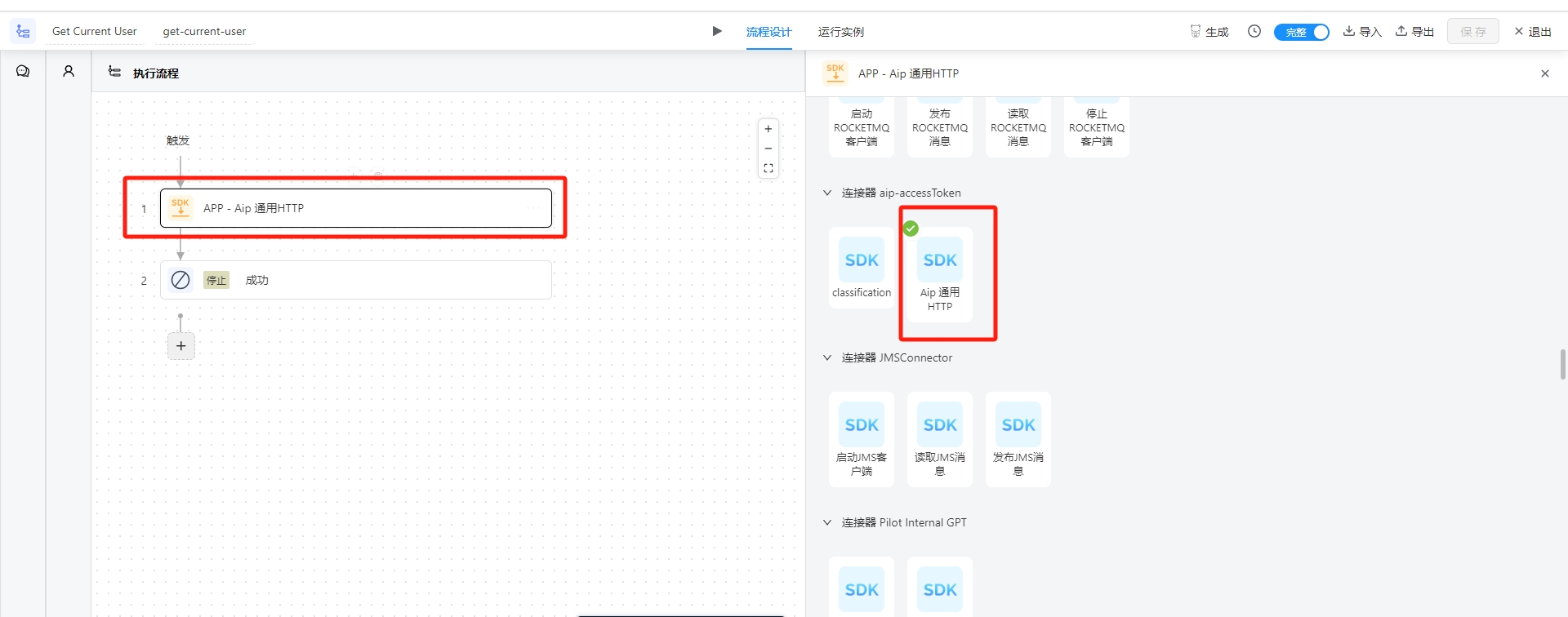
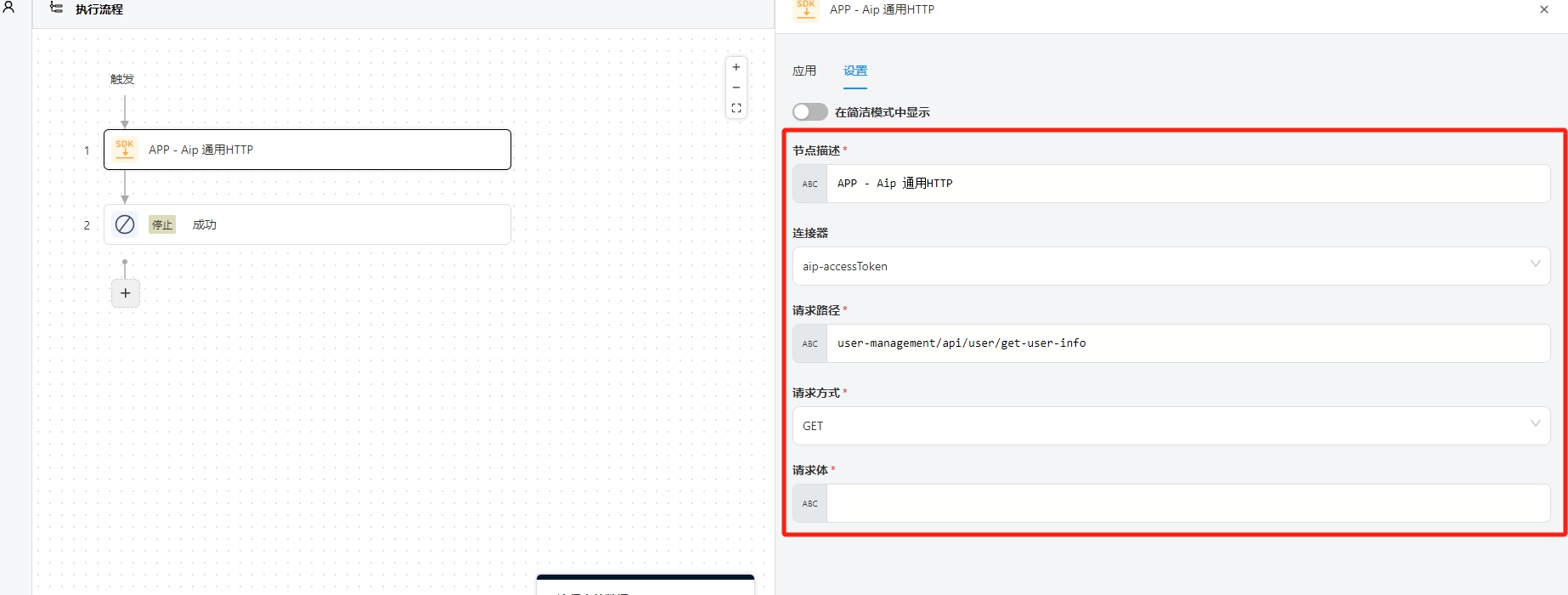
http connector
An HTTP connector primarily consists of two parts: connectorType and action. The connectorType mainly handles authentication with third-party websites and returns the corresponding authentication information, while the action uses this authentication information to perform operations on the third-party website.
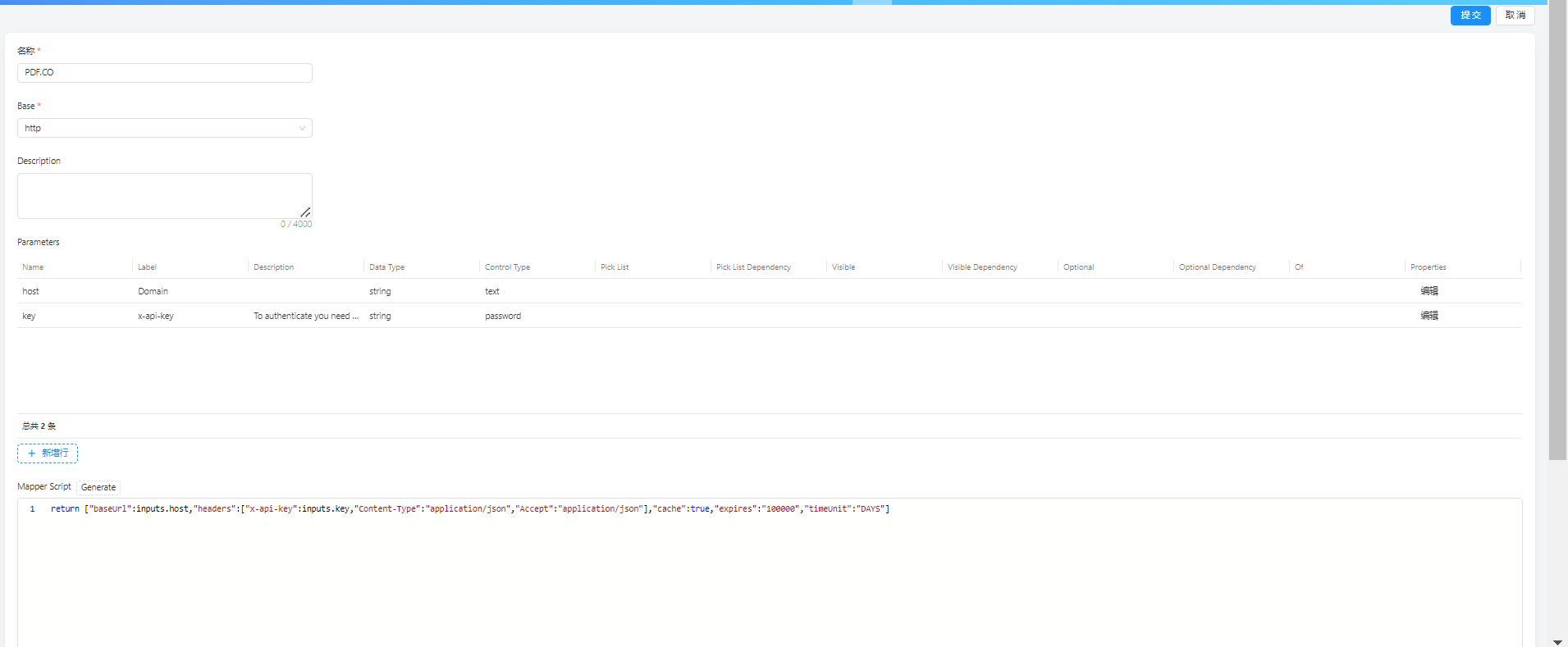
1. connectorType
connectorType is composed of five main parts: Name, Base, Description, Parameters, and Script.
1.1 Name
As the name suggests, this is the name you give to the current connectorType. Ideally, the name should clearly indicate which website this connectorType corresponds to.
1.2 Base
Since this is an HTTP connector, choose http.
1.3 Description
This is the description section for the connectorType.
1.4 Parameters
The action also has Parameters, which work similarly to those in connectorType, so they will not be repeated here.

1.4.1 Name
The Name must be unique within the current level of Parameters. It is recommended to use camelCase.
1.4.2 Label
The Label is the display name for the current input. Since internationalization is not currently supported, the language used should match the language of the target customers.
1.4.3 Description
This describes the current input.
1.4.4 Data Type
The type of data being input. Currently supported types include:
string(text)number(numeric)bool(true/false)file(file link)date_time(2024-01-23T08:07:10.398Z)date(2024-01-23)object(key-value pairs)array(array)
If the dataType is an array type, you need to specify of. If of is object, you need to edit the key-value pairs of the object. Similarly, if dataType is object, you need to edit its key-value pairs.
1.4.5 Control Type
The display type for the input. Currently supported types include:
texttext_areapasswordnumbercheckboxselectmultiselectdatedate_time
1.4.6 Pick List
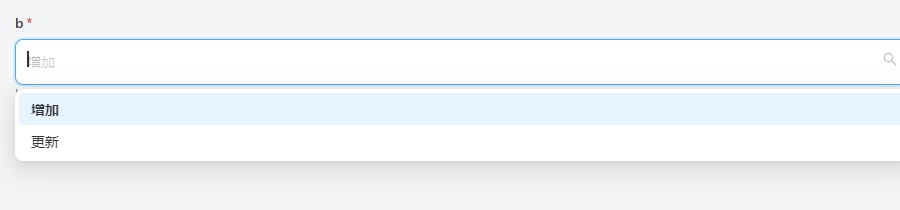
This is generally used for select and multiselect fields. It uses Groovy to return an array. The Groovy script has one input, $parameters, which represents the values of all current inputParameters. Ideally, the documentation should describe the possible input values for the inputField and return an array instead of asking the user to fill it in. Here are two examples:
()->"POST"==$parameters.b?["POST"]:["PUT","DELETE","GET"]
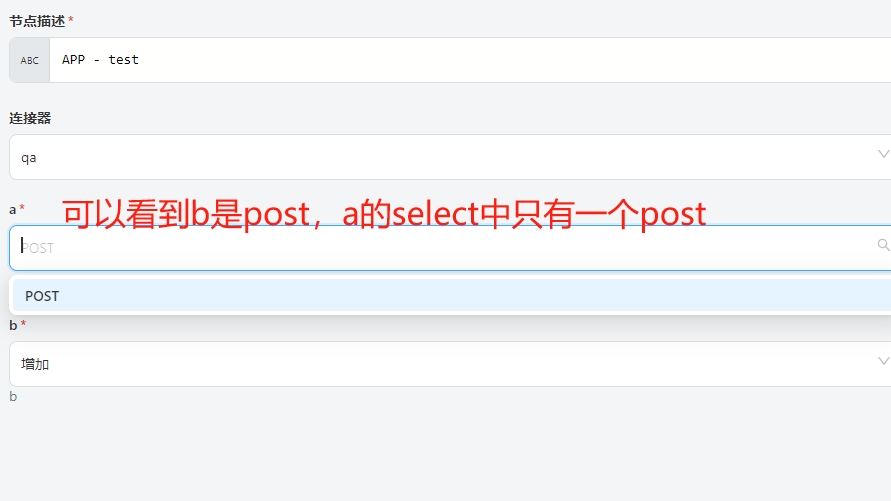
Includes label and value, more user-friendly
()->[["label":"Increase","value":"POST"],["label":"renew","value":"PUT"]]
1.4.7 Pick List Dependency
This indicates which other inputField.name the current Pick List depends on.
1.4.8 Visible
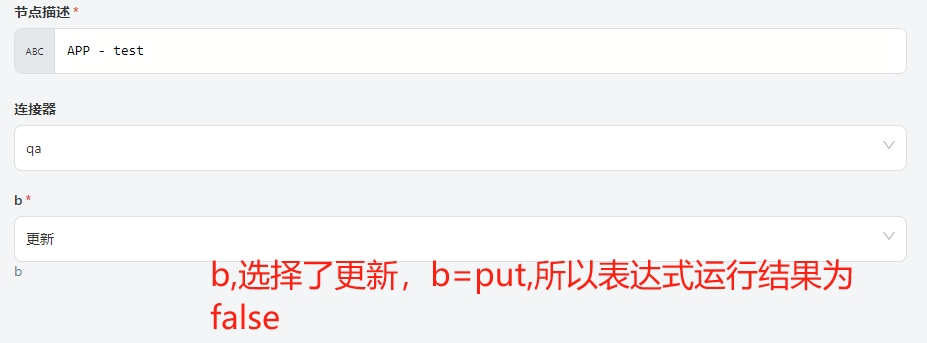
This determines whether the current inputField is displayed. It uses Groovy to return a true/false value. The Groovy script has one input, $parameters, which represents the values of all current inputParameters. Here is an example:
()->"POST"==$parameters.b
1.4.9 Visible Dependency
This indicates which other inputField.name the current Visible condition depends on.
1.4.10 Optional
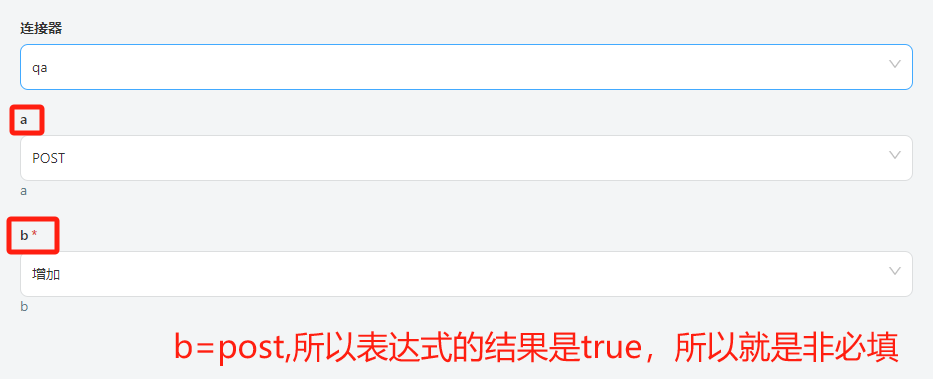
This indicates whether the current inputField is required. By default, it is false (required). It uses Groovy to return a true/false value. Here is an example:
()->"POST"==$parameters.b
1.4.11 Optional Dependency
This indicates which other inputField.name the current Optional condition depends on.
1.5 Script
This is primarily written in Groovy. The script has two main inputs: inputs (a map structure containing the values filled in for the current connectorType) and instanceJson (a string representing the instanceJsonToDb). It constructs a connectorInstance and ultimately returns a map with the following keys:
baseUrl: The domain name that theactionneeds to access.headers: A map added to the request headers of theaction.queryParam: A map added to the request path of theaction.proxyHost: The proxy host.proxyPort: The proxy port (used together withproxyHostwhen accessing certain websites requires a proxy).ignoreSSL: A boolean value indicating whether to ignore the HTTPS certificate (default isfalse).cache: A boolean indicating whether caching is enabled.expires: The cache duration.timeUnit: The time unit for the cache duration (e.g.,DAYS,HOURS,MINUTES,SECONDS,MILLISECONDS,MICROSECONDS,NANOSECONDS). Caching is enabled only ifcache,expires, andtimeUnitare all valid values.refresh: A boolean indicating whether token refresh is supported.instanceJsonToDb: A string storing key information in the database. When the data of theconnectorinstance changes andinstanceJsonToDbis refreshed, it will be empty.whenActionFailExeRefreshConditionScript: A boolean (default istrue) indicating whether therefreshConditionScriptGroovy script should only be executed when theactionfails.refreshConditionScript: A Groovy script that checks whether to refresh theconnectorInstance. This script should return atrueorfalsevalue. It has one input,actionResult(the result of executing theaction). Here is an example:
if (null != actionResult && actionResult.get("statusCode") == 401 && actionResult.containsKey("body")) {
    def body = actionResult.get("body")
    Map bodyBean = JSONUtil.toBean(body, Map.class)
    if ("INVALID_TOKEN".equals(bodyBean.get("code")))
        return true
}
return false
Here is an example of a map:
return [
    "baseUrl": bean.api_domain,
    "headers": ["Authorization": "Zoho-oauthtoken " + bean.access_token, "Content-Type": "application/json"],
    "cache": true,
    "expires": (bean.expires_in - 600),
    "timeUnit": "SECONDS",
    "refresh": true,
    "refreshConditionScript": refreshConditionScript
]
However, when obtaining authentication information based on key information in parameters, it is often necessary to make an HTTP request to get the authentication information. Therefore, you need to make an HTTP request first and then assemble the returned map.
def connectorResult = connector.http {
    headers = [map request headers]
    path = [string request path]
    queryParams = [map path parameters]
    body = [object request body]
    method = [string request method, e.g., "POST", "GET", "PUT", "DELETE"]
    contentType = [string content type, e.g., "application/json", "form-data", "x-www-form-urlencoded" (refer to Postman)]
    proxyHost = [string proxy host]
    proxyPort = [int proxy port]
    ignoreSSL = [boolean, default false]
    baseUrl = [string domain name for the current HTTP request]
}
The return values of connectorResult include:
status: The HTTP status code.body: The response body of the HTTP request.headers: The returned request headers.msg: The failure message if the request fails.
Here is a more complete and complex example:
import cn.hutool.json.JSONUtil
import com.bot.common.exception.CustomException
import cn.hutool.core.util.NumberUtil

String refreshConditionScript = "import cn.hutool.json.JSONUtil\n" +
        "if (null != actionResult && actionResult.get(\"statusCode\") == 401 && actionResult.containsKey(\"body\")) {\n" +
        "    def body = actionResult.get(\"body\")\n" +
        "    Map bodyBean = JSONUtil.toBean(body, Map.class)\n" +
        "    if (\"INVALID_TOKEN\".equals(bodyBean.get(\"code\")))\n" +
        "        return true\n" +
        "}\n" +
        "return false"

if (null != instanceJson && JSONUtil.isTypeJSONObject(instanceJson)) {
    def map = JSONUtil.toBean(instanceJson, Map.class)
    def refreshToken = map.get("refresh_token")
    def connectorResult = connector.http {
        method "POST"
        baseUrl inputs.host
        path "/oauth/v2/token?refresh_token=" + refreshToken + "&client_id=" + inputs.client_id + "&client_secret=" + inputs.client_secret + "&grant_type=refresh_token"
    }
    if (connectorResult.status == 200) {
        def bean = JSONUtil.toBean(connectorResult.body, Map.class)
        if (null != bean.access_token && bean.access_token.trim().length() > 0) {
            return [
                "baseUrl": bean.api_domain,
                "headers": ["Authorization": "Zoho-oauthtoken " + bean.access_token, "Content-Type": "application/json"],
                "cache": true,
                "expires": (bean.expires_in - 600),
                "timeUnit": "SECONDS",
                "refresh": true,
                "refreshConditionScript": refreshConditionScript
            ]
        } else {
            throw new CustomException(JSONUtil.toJsonStr(connectorResult))
        }
    } else {
        throw new CustomException(JSONUtil.toJsonStr(connectorResult))
    }
} else {
    def connectorResult = connector.http {
        headers (["Content-Type": "application/x-www-form-urlencoded"])
        method "POST"
        contentType "x-www-form-urlencoded"
        path "/oauth/v2/token"
        baseUrl inputs.host
        body ([
            "grant_type": inputs.grant_type,
            "client_id": inputs.client_id,
            "client_secret": inputs.client_secret,
            "redirect_uri": inputs.redirect_uri,
            "code": inputs.code
        ])
    }
    if (connectorResult.status == 200) {
        def bean = JSONUtil.toBean(connectorResult.body, Map.class)
        if (null != bean.access_token && bean.access_token.trim().length() > 0) {
            return [
                "baseUrl": bean.api_domain,
                "headers": ["Authorization": "Zoho-oauthtoken " + bean.access_token, "Content-Type": "application/json"],
                "cache": true,
                "expires": (bean.expires_in - 600),
                "timeUnit": "SECONDS",
                "refresh": true,
                "instanceJsonToDb": connectorResult.body,
                "refreshConditionScript": refreshConditionScript
            ]
        } else {
            throw new CustomException(JSONUtil.toJsonStr(connectorResult))
        }
    } else {
        throw new CustomException(JSONUtil.toJsonStr(connectorResult))
    }
}
2. Action
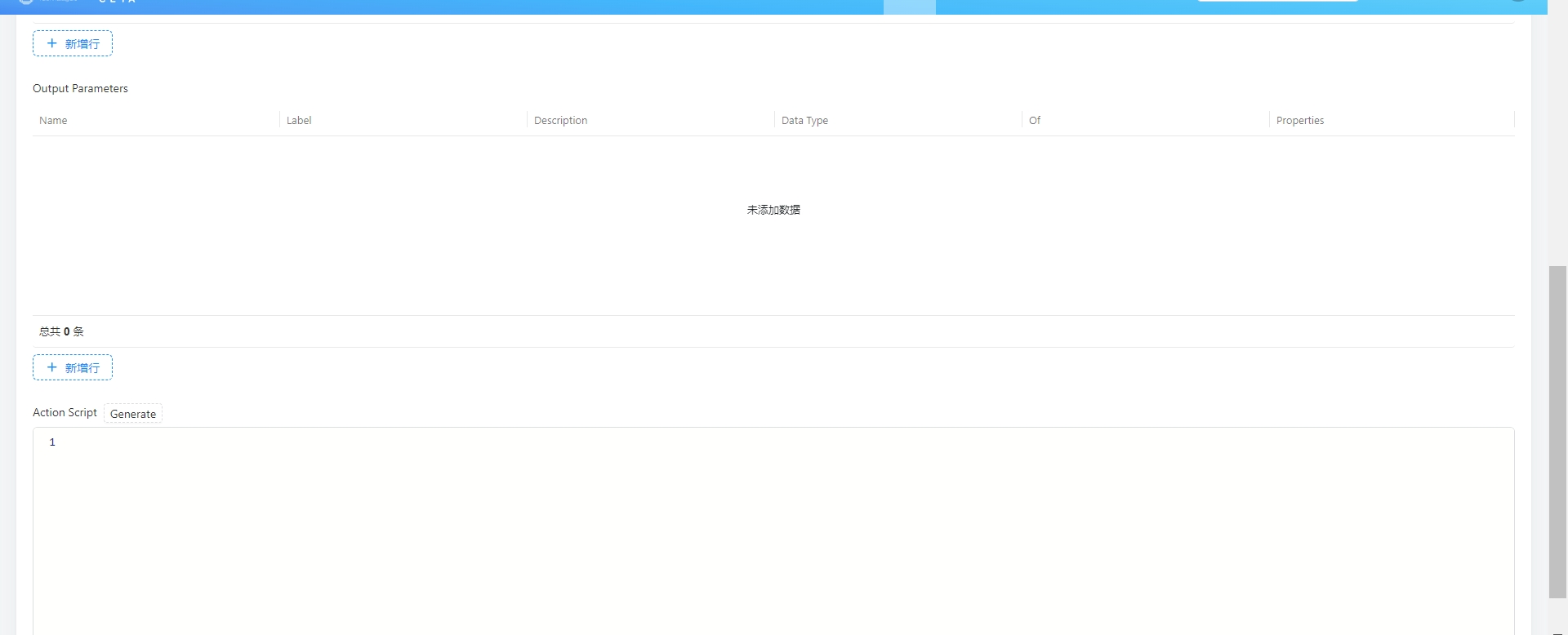
An action is a description of an operation on a website, primarily composed of Name, Connector-Type, Input Parameters, Output Parameters, and Action Script.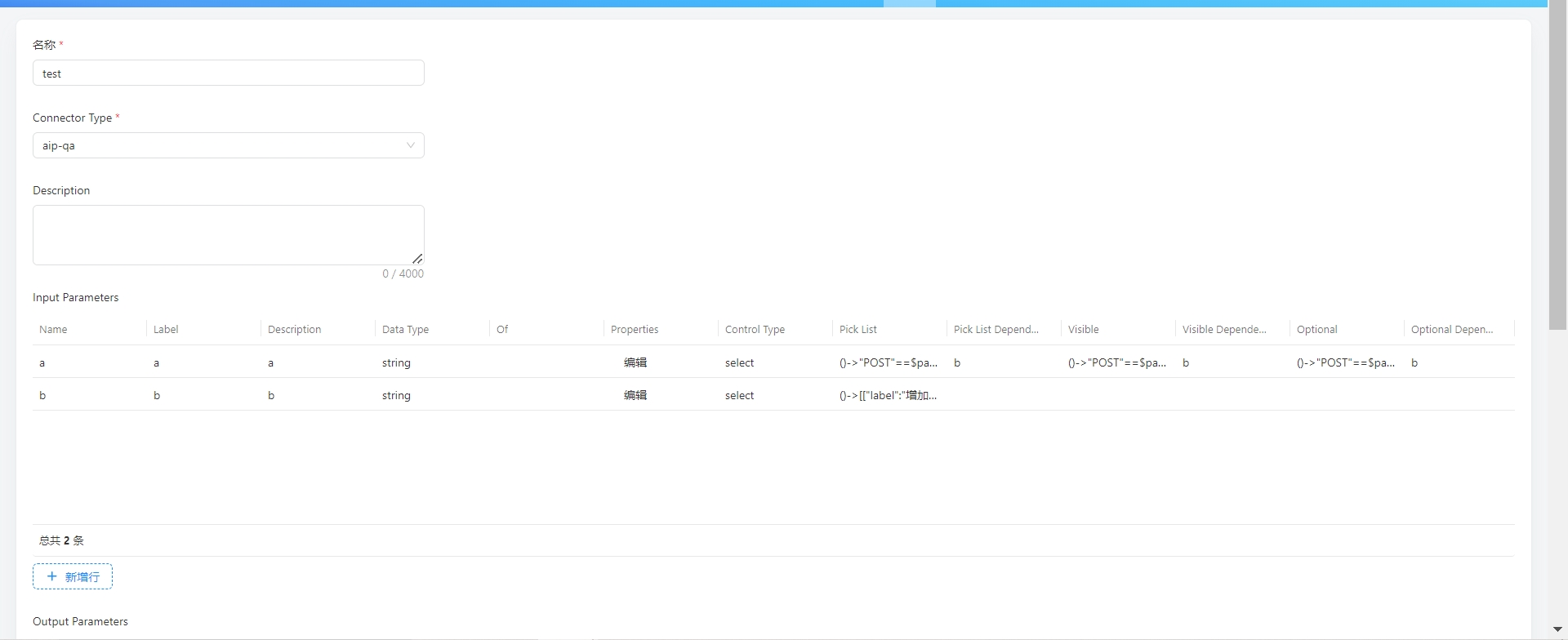
2.1 Name
The name of the action, which is generally the resource being operated on. Ideally, the name should clearly indicate what operation is being performed and on what.
2.2 Description
A further description of the operation.
2.3 Input Parameters
The usage is the same as the Input Parameters in connectorType.
2.4 Output Parameters
The description of the output.
2.5 Action Script
This is primarily written in Groovy. The input parameters are inputs (the values of the Input Parameters) and connectorInstance (the values of connectorType.inputParameters).
def actionResult = context.http {
    headers = [map request headers]
    path = [string request path]
    method = [string request method, e.g., "GET", "HEAD", "POST", "PUT", "PATCH", "DELETE", "OPTIONS", "TRACE" (all in uppercase)]
    queryParams = [map path parameters]
    body = [object request body]
    contentType = [string content type, e.g., "application/json", "form-data", "x-www-form-urlencoded" (refer to Postman)]
    returnType = [return type, e.g., "json", "xml", "file", "html" (optional)]
    resultScriptCode = [script for processing the return result, currently supports "html" type, with the input parameter being "body" (string type), which is the response body after a successful request]
}
The return values of actionResult include:
body: The content returned by the request.statusCode: The HTTP status code.headers: The headers returned in the response.data: The result based onreturnType. Forjson,xml, andfile, it returns an object. Forhtml, it returns the result based on theresultScriptCodescript.success: A boolean indicating whether the request was successful.message: Generally, the failure message if the request fails.
You can set actionResult.refresh = true/false based on statusCode, message, success, etc. In connectorType, when constructing connectorInstance, there are three parameters related to refreshing the connectorInstance: refresh, whenActionFailExeRefreshConditionScript, and refreshConditionScript. The overall logic is as follows:
- First,
connectorInstance.refresh == true. - If
actionResult.refresh == true, a refresh can be performed. - If
connectorInstance.whenActionFailExeRefreshConditionScript == trueandactionResult.success == false, then therefreshConditionScriptscript is executed to determine whether to refresh based on its return value. - If
connectorInstance.whenActionFailExeRefreshConditionScript == false, then therefreshConditionScriptscript is executed to determine whether to refresh based on its return value. For better performance, it is recommended to setwhenActionFailExeRefreshConditionScripttotrue.
Example code:
Example 1: For a website where you do not want to write an action for each REST API, you can create a generic HTTP action like this:
import cn.hutool.json.JSONUtil

def strBody = inputs.body
def objBody = [:]
if (null != strBody) {
    if (JSONUtil.isTypeJSONObject(strBody)) {
        objBody = JSONUtil.toBean(strBody, Map.class)
    } else if (JSONUtil.isTypeJSONArray(strBody)) {
        objBody = JSONUtil.toList(strBody, Map.class)
    } else {
        objBody = strBody
    }
}

return context.http {
    path inputs.path
    method inputs.method
    body (objBody)
}
Example 2: For paginated APIs, if the data volume is manageable, you can fetch all data at once within the action without needing to loop in the flow:
import java.util.stream.Collectors

def page_size = inputs.pageSize
if (page_size == null) {
    page_size = 10
} else {
    page_size = Integer.valueOf(page_size)
}
def hasMore = true
def userList = new ArrayList()
def queryParams = [
    "user_id_type": inputs.userIdType,
    "department_id_type": inputs.departmentIdType,
    "department_id": inputs.departmentId,
    "page_size": page_size,
    "page_token": inputs.pageToken
]

while (hasMore) {
    def queryUrl = queryParams.entrySet().stream()
        .filter { entry -> null != entry.getValue() }
        .map { entry -> entry.getKey() + "=" + entry.getValue() }
        .collect(Collectors.joining("&"))
    def page = context.http {
        path "open-apis/contact/v3/users/find_by_department" + "?" + queryUrl
        method "GET"
    }
    if (page.statusCode == 200) {
        hasMore = page.data.data.has_more
        queryParams.put("page_token", page.data.data.page_token)
        if (page.data.data.items != null) {
            userList.addAll(page.data.data.items)
        }
    } else {
        throw new RuntimeException(page.data.message)
    }
}
return ["userList": userList]
Example 3: Similar to this, set refresh = true:
def actionResult = context.http {
    method "DELETE"
    path "delete/user/" + inputs.id
}

if (actionResult.statusCode == 401) {
    actionResult.refresh = true
}
return actionResult
Using ConnectorType and Action
After creating the corresponding connectorType and action according to the rules, here is how to use them:
Step 1: Create a connector type PBC. If you already have a connector type PBC, you can skip this step.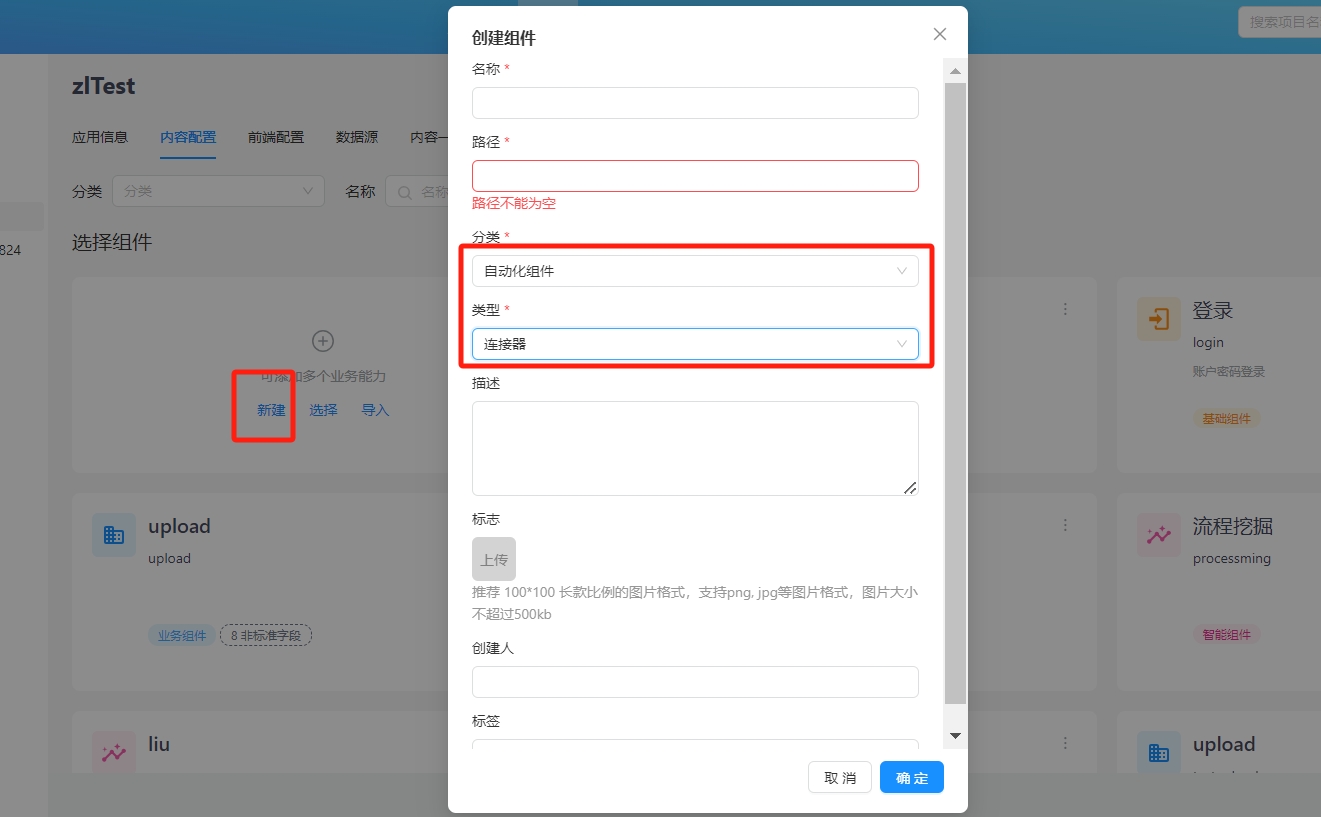 Step 2: In the
 connector type PBC, create a new connector and select the required connectorType.
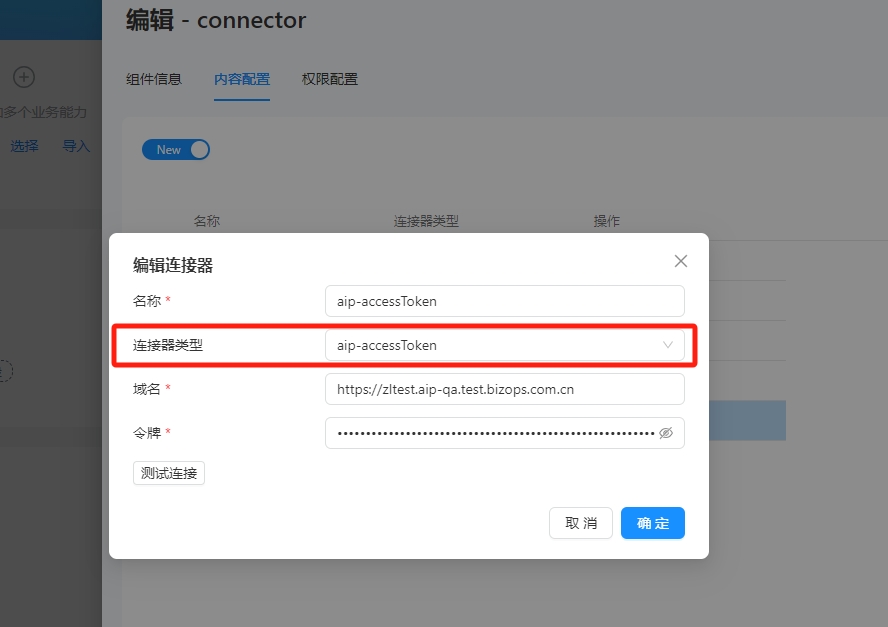 Step 3: Use the
 action and connector in a flow.
Select the corresponding action in the application and fill in the required parameters.