SSO
Applications on CETA support not only username and password login but also standard SSO protocols such as OAuth2, CAS, and OIDC.
1. Documentation
Please familiarize yourself with the SSO protocols you intend to implement:
- OAuth2:
- OIDC:
- CAS:
2. Principle
If you have thoroughly read the above SSO protocols, as a client, you only need to focus on how to invoke the authentication service (i.e., redirect_uri) and the callback after authentication completion (i.e., callback, which determines the user). CETA provides extensions for redirect_url and callback.
3. Usage Steps
3.1 Configure Login
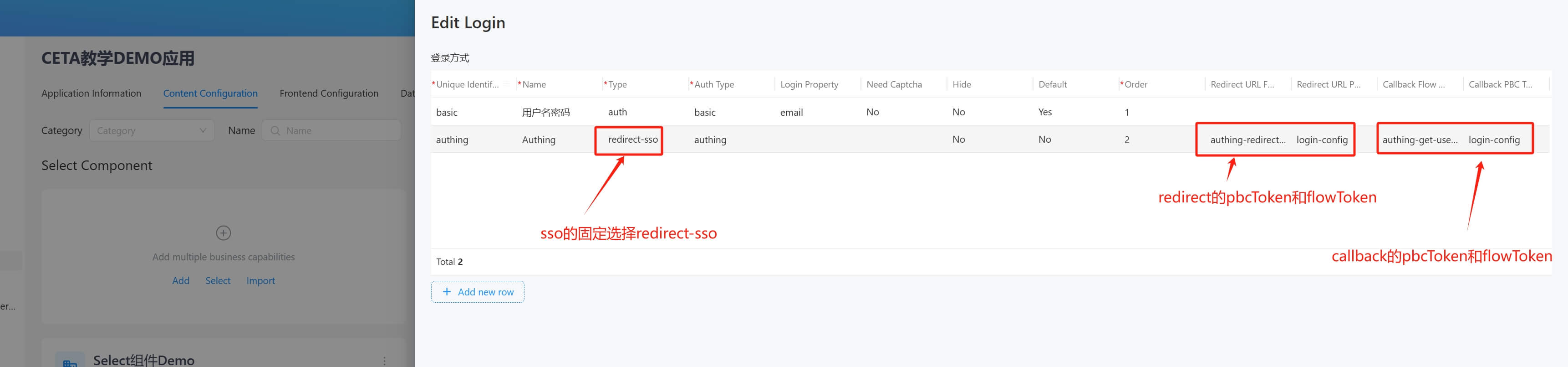
Configure the login method. For details, see the figure below:
- Unique Identifier: A unique identifier.
- Auth Type: Use
basicfor username and password login; for SSO, choose any relevant type. - Login Property: Only required for
basic, indicating which field in the user table to match, usuallyemailornickname. - Need Captcha: Whether to require a captcha, only effective for
basic. - Hide: Whether to display.
- Default: Whether it is the default login method.
- Order: Display order.
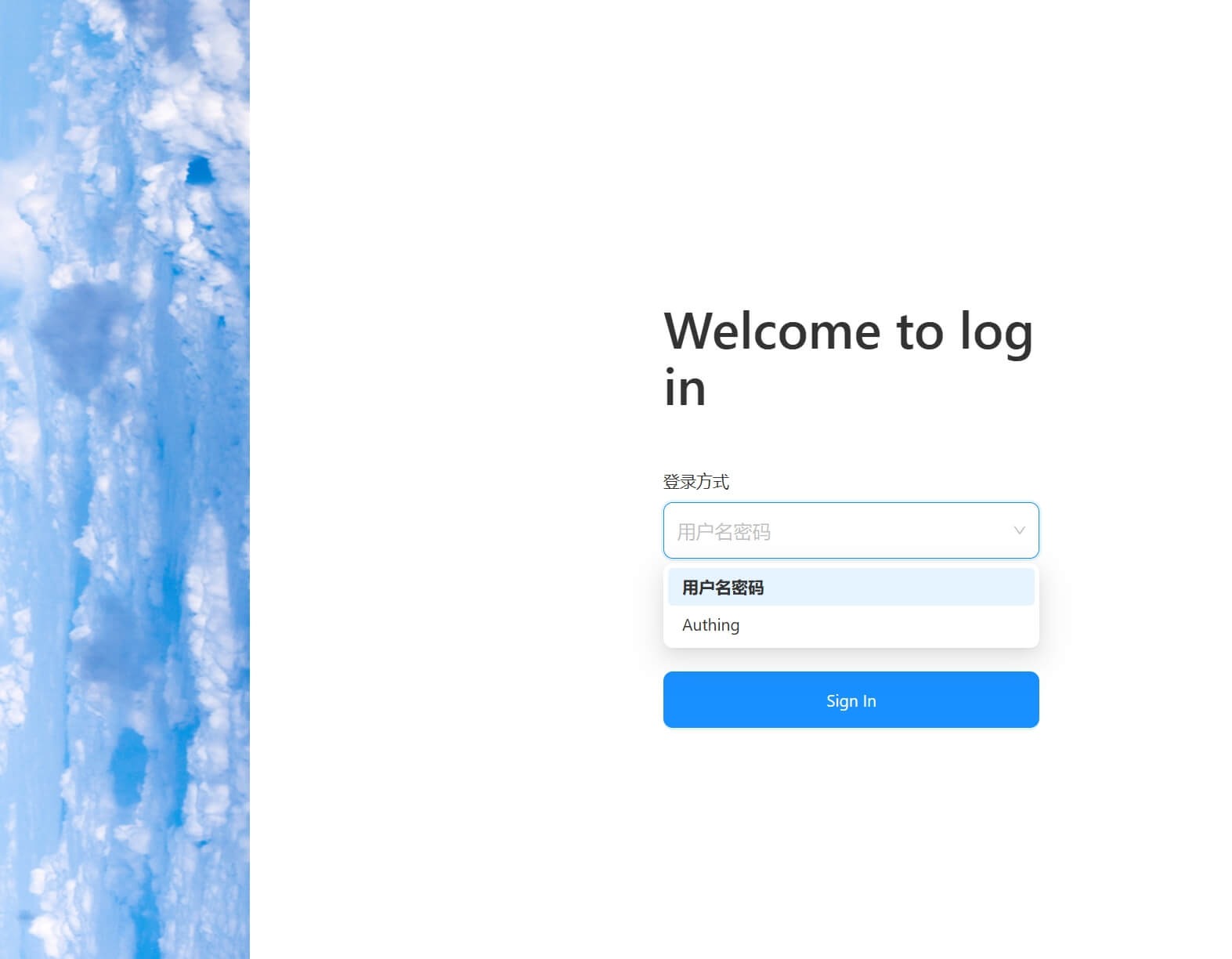
 The display effect after configuration:
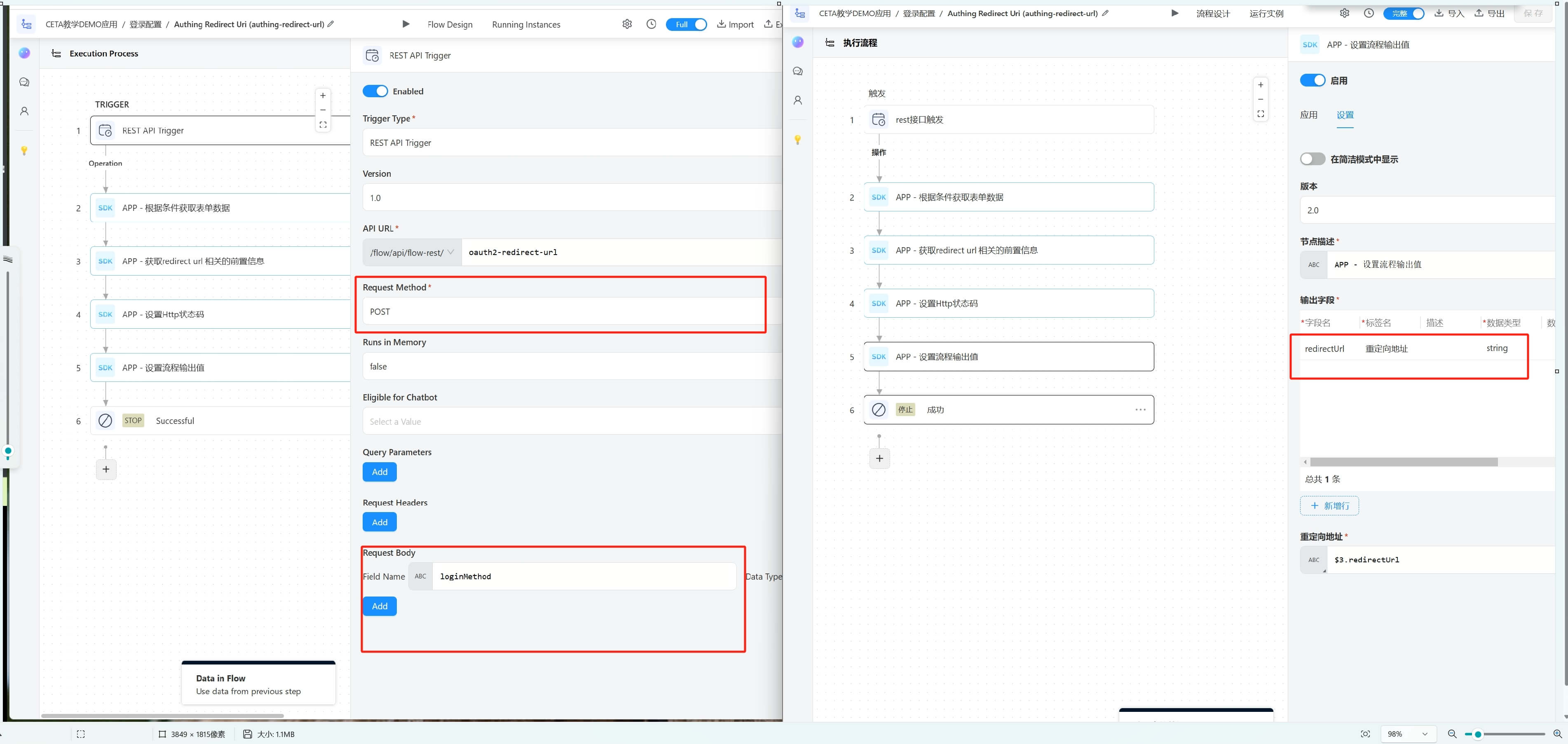
3.2 Configure the redirect_url Flow
- REST Trigger Requirements:
- Must be a REST-Flow.
- Use a POST request.
- Requires one input parameter:
loginMethod: The current login method, corresponding to the configuration in 3.1.
- Flow Output Settings:
- The output key must be
redirectUrl, containing the address of the third-party authentication service.
- The output key must be
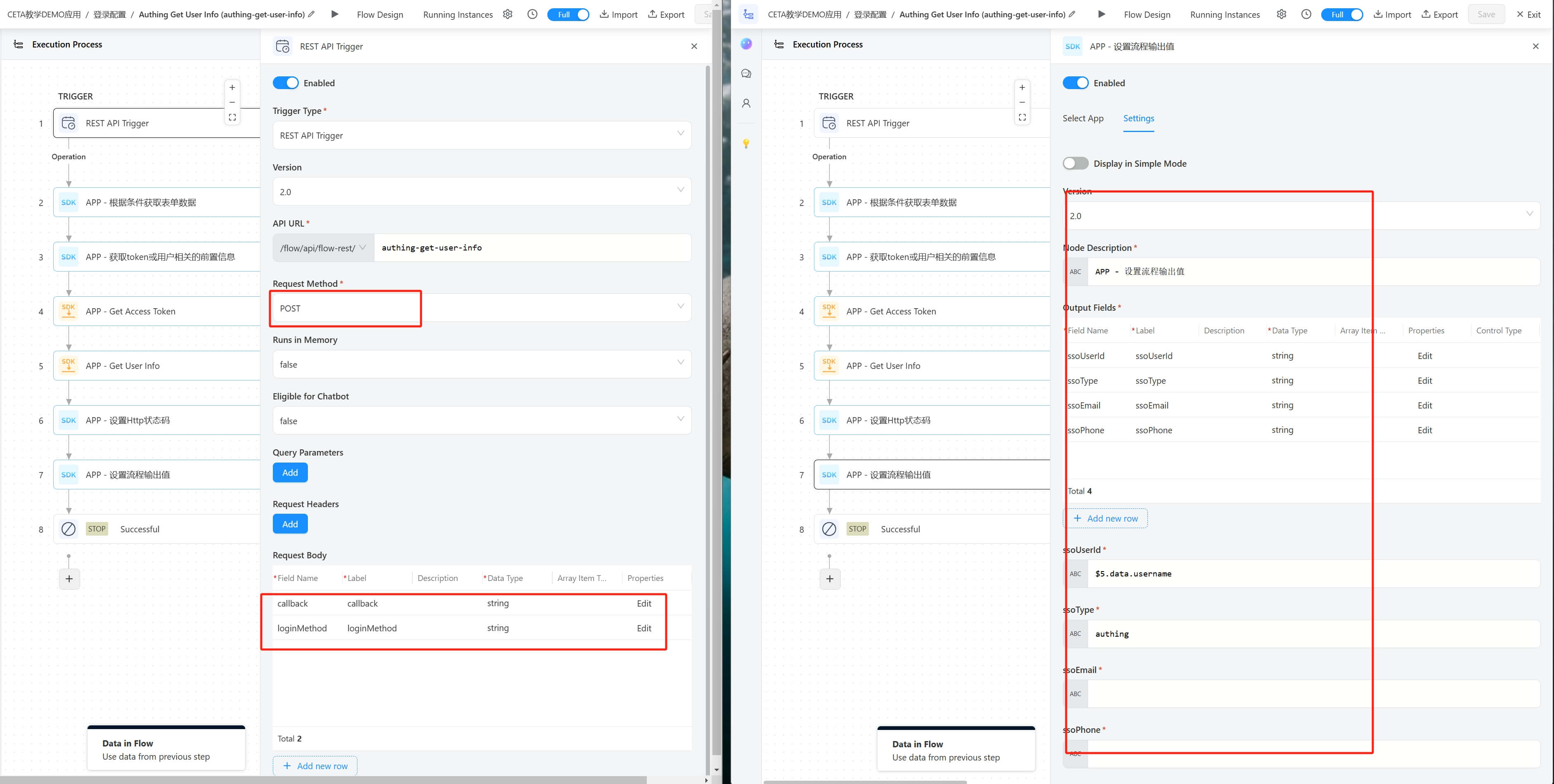
3.3 Configure the callback Flow
- REST Trigger Requirements:
- Must be a REST-Flow.
- Use a POST request.
- Requires two input parameters:
loginMethod: The current login method, corresponding to the configuration in 3.1.callback: The content returned by the authentication service.
- Flow Output Settings:
- Must include the following four values:
ssoUserId: The unique identifier of the SSO user.ssoType: TheAuth Typefrom the configuration in 3.1.ssoEmail: The user's email.ssoPhone: The user's phone number.
- Must include the following four values:
3.4 Configure Users
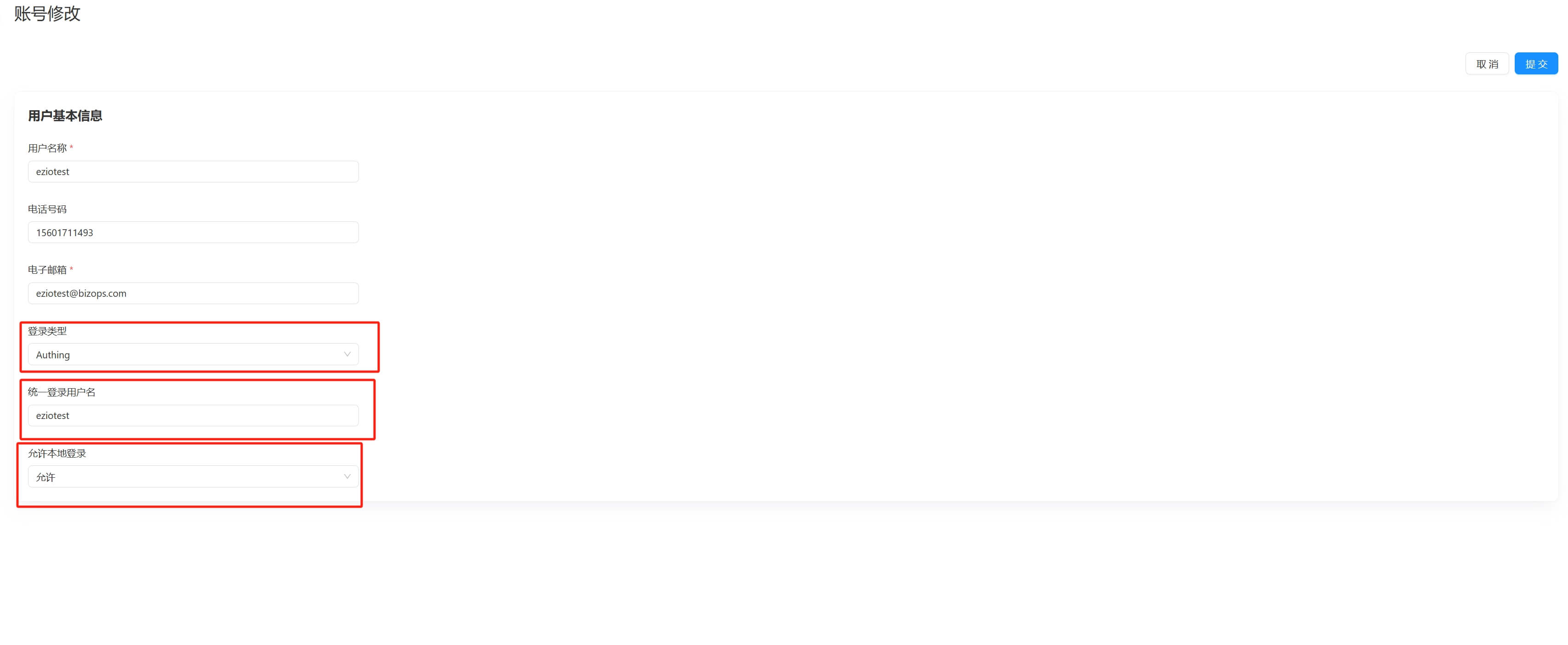
- Login Type: The type of SSO supported, corresponding to the
sso_typein the user table. - Unified Login Username: The unique identifier of the SSO user, corresponding to the
sso_usernamein the user table. - Allow Local Login: Whether to allow login with username and password, corresponding to the
sso_allow_builtinin the user table.
3.5 User Matching
- User Matching Logic
getSsoMappedUser:- Find the user by
ssoUserId,ssoType, andprojectToken. - First, try to match
sso_typeandsso_username. - If no user is found, check if
ssoUserIdcontains@:- If it is an email address, match
sso_typeandemail. - Otherwise, match
sso_typeandusername.
- If it is an email address, match
- Filter out users with an empty
sso_username. - If multiple users are found, throw an exception.
- If no user is found, return
null. - Return the found user (if any).
- Find the user by
- Matching Steps:
- First, match using the
ssoUserIdfrom 3.3. - If no user is found and the
ssoEmailfrom 3.3 is not empty, then match using thessoEmail.
- First, match using the
The matching rules are described in detail in the code:
// User Matching
private UserPo getSsoMappedUser(String ssoUserId, String ssoType, String projectToken) {
    List<UserPo> users = userManagementRepository.findUserByProperties(
            projectToken, Map.of(
                    "sso_type", ssoType,
                    "sso_username", ssoUserId
            ));
    if (users.isEmpty()) {
        if (ssoUserId.contains("@")) {
            users = userManagementRepository.findUserByProperties(
                    projectToken, Map.of(
                            "sso_type", ssoType,
                            "email", ssoUserId
                    ));
        } else {
            users = userManagementRepository.findUserByProperties(
                    projectToken, Map.of(
                            "sso_type", ssoType,
                            "username", ssoUserId
                    ));
        }
        users = users.stream().filter(userPo -> StringUtils.isBlank(userPo.getSsoUsername())).collect(Collectors.toList());
    }
    if (users.size() > 1) {
        throw new IllegalArgumentException("More than 1 user can login with ssoType: " + ssoType + " ssoId: " + ssoUserId);
    }
    if (users.isEmpty()) {
        return null;
    }
    return users.get(0);
}

// loginMethodToken is the selected authentication type
// First, match using the ssoUserId returned in **3.3**
UserPo user = getSsoMappedUser(ssoUserInfo.getSsoUserId(), loginMethodToken, projectToken);
if (null == user && ssoUserInfo.getSsoEmail() != null) {
    // If no user is found, match using the ssoEmail returned in **3.3**
    user = getSsoMappedUser(ssoUserInfo.getSsoEmail(), loginMethodToken, projectToken);
}