Dot Walking Script
Dot Walking Script (DW) can use native Groovy and our built-in functions. It can be used in Groovy scripts and Flow inputs.
1. Use Cases
Data can be passed using the $.xx.xx format in inputs and Groovy, where array values are passed using $.xx.xx[n].xx.
1.1 Using in Flow Inputs
Switch the input to Groovy mode, and you can use the $.xx.xx format to pass data within the Groovy script.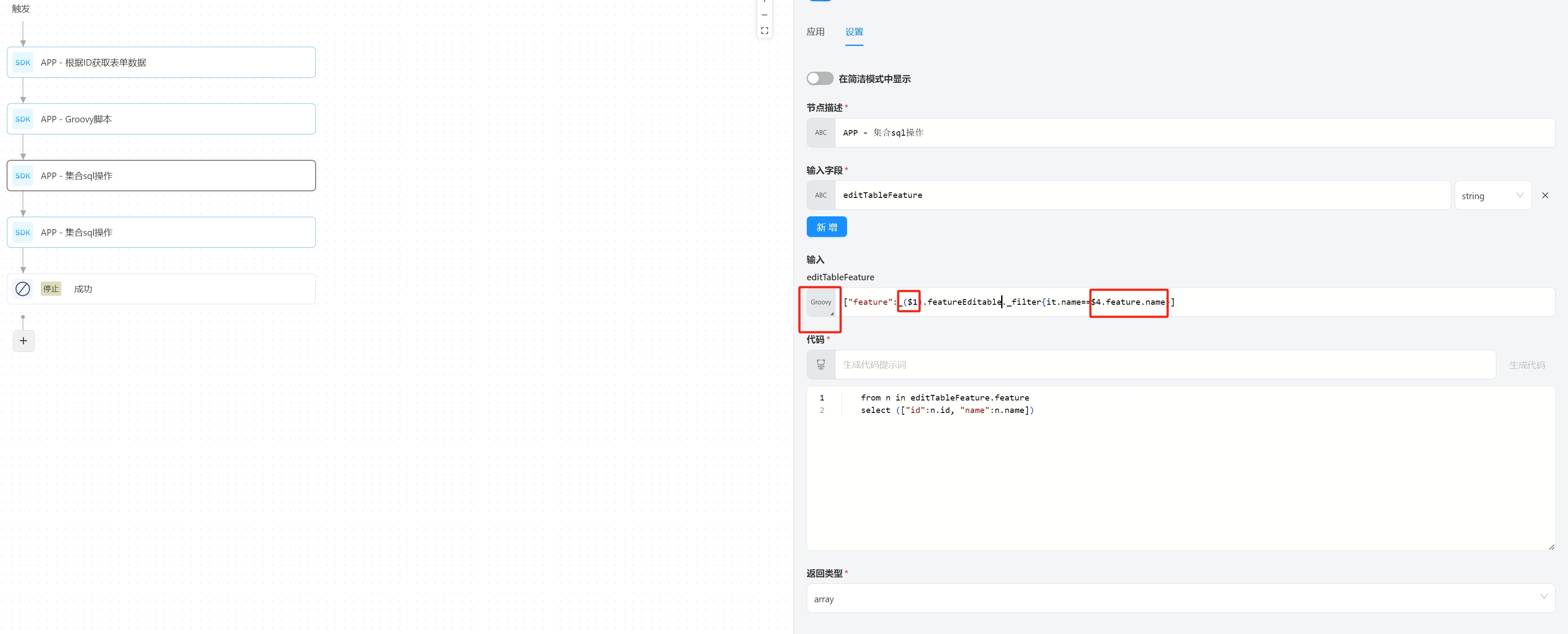
1.2 Using in Groovy Scripts
Parameters can be passed using input fields in Groovy SDKs.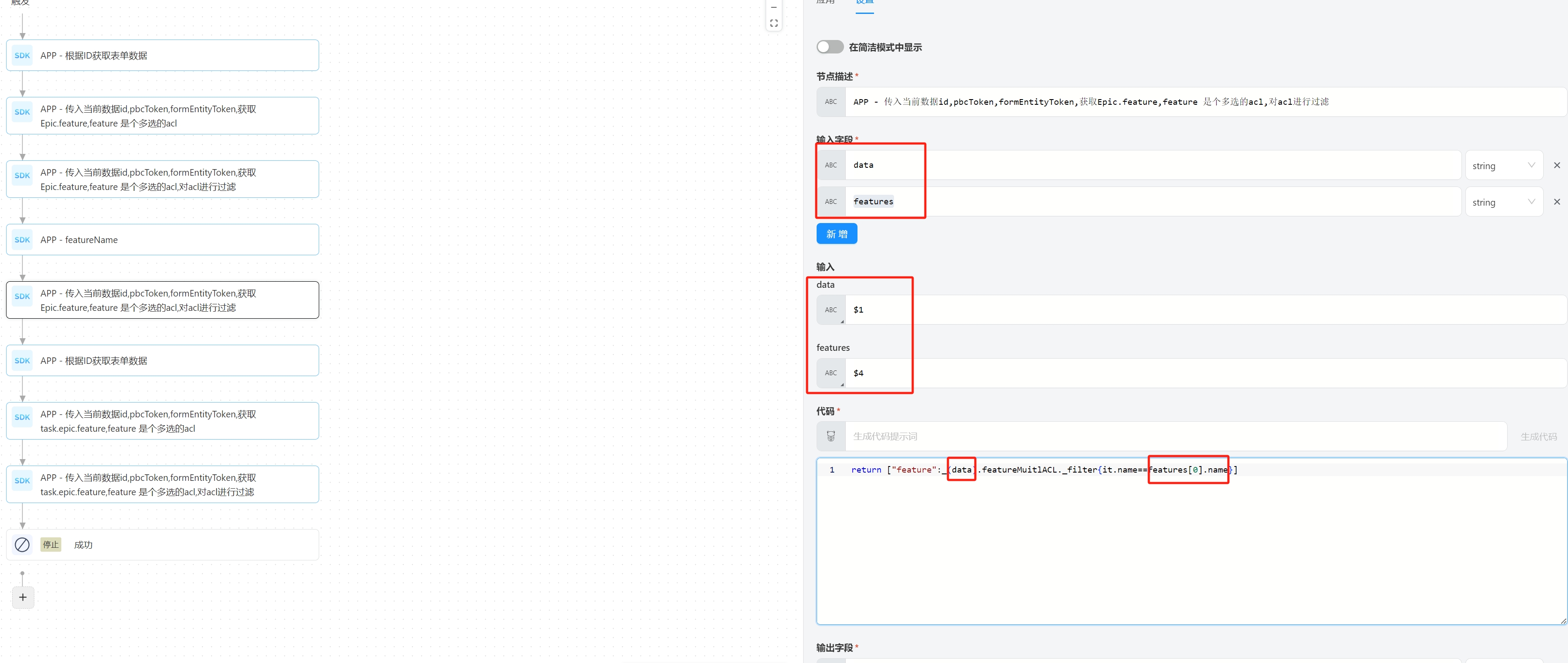
1.3 Unsupported Parameter Passing
Parameters defined within Groovy scripts are not supported for passing, such as epicData in this example. Similarly, parameters defined in Flow inputs are also not supported for passing.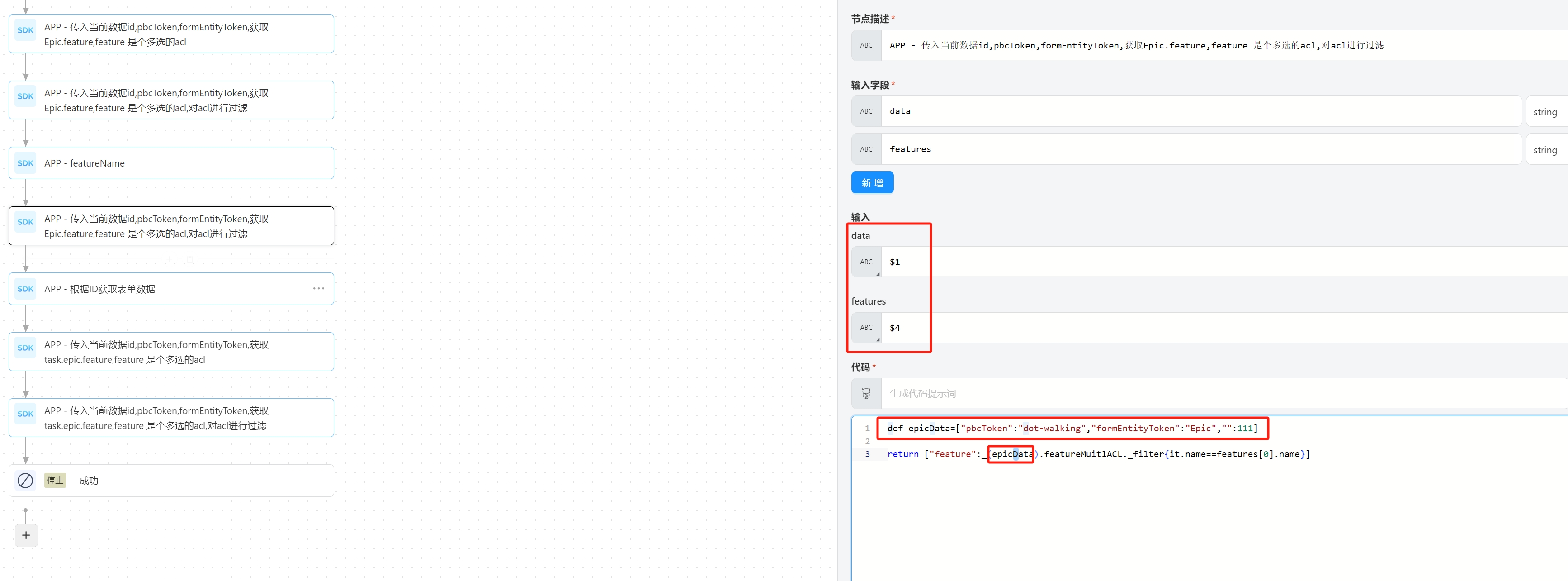
2. Example Forms
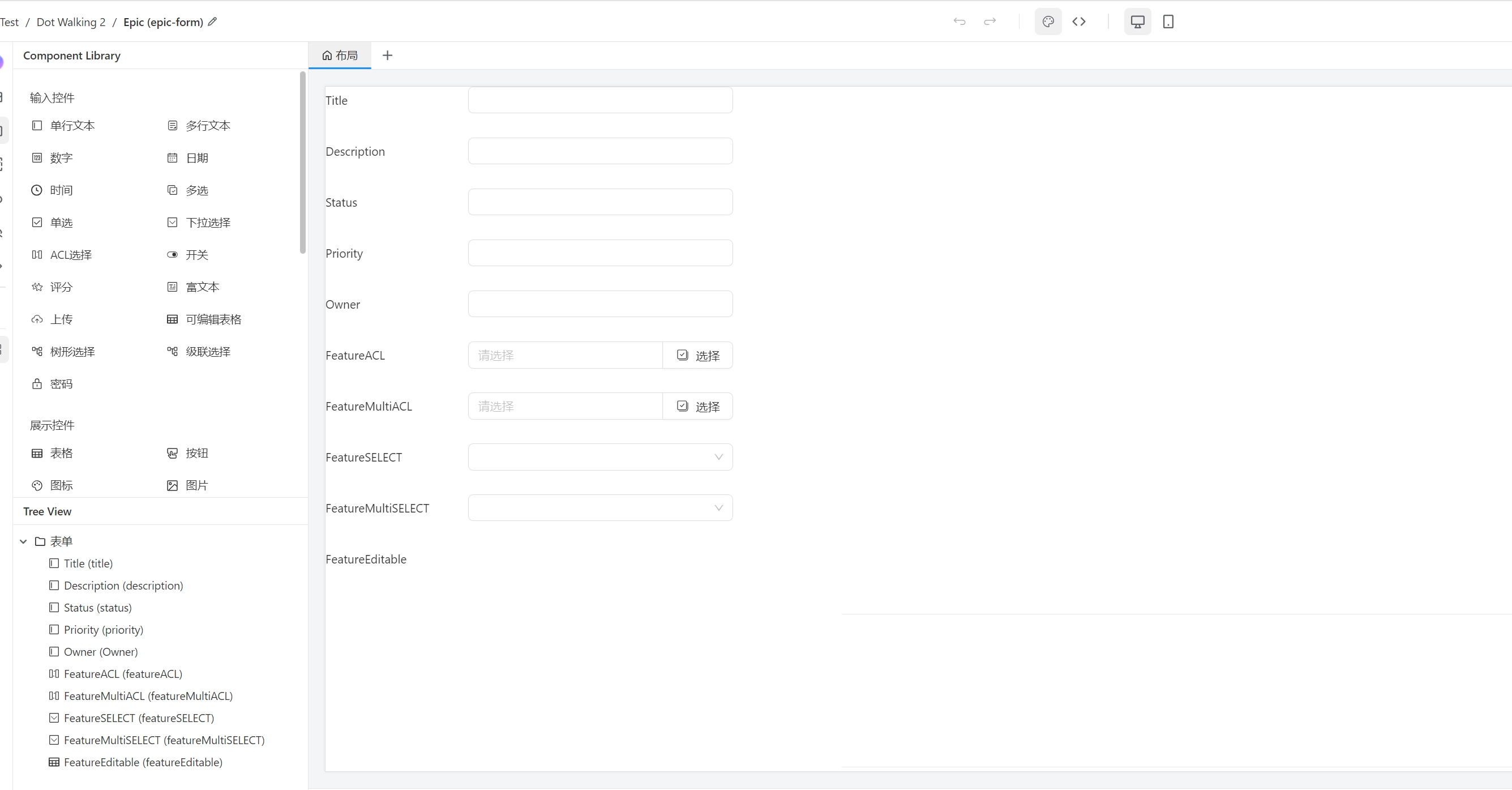
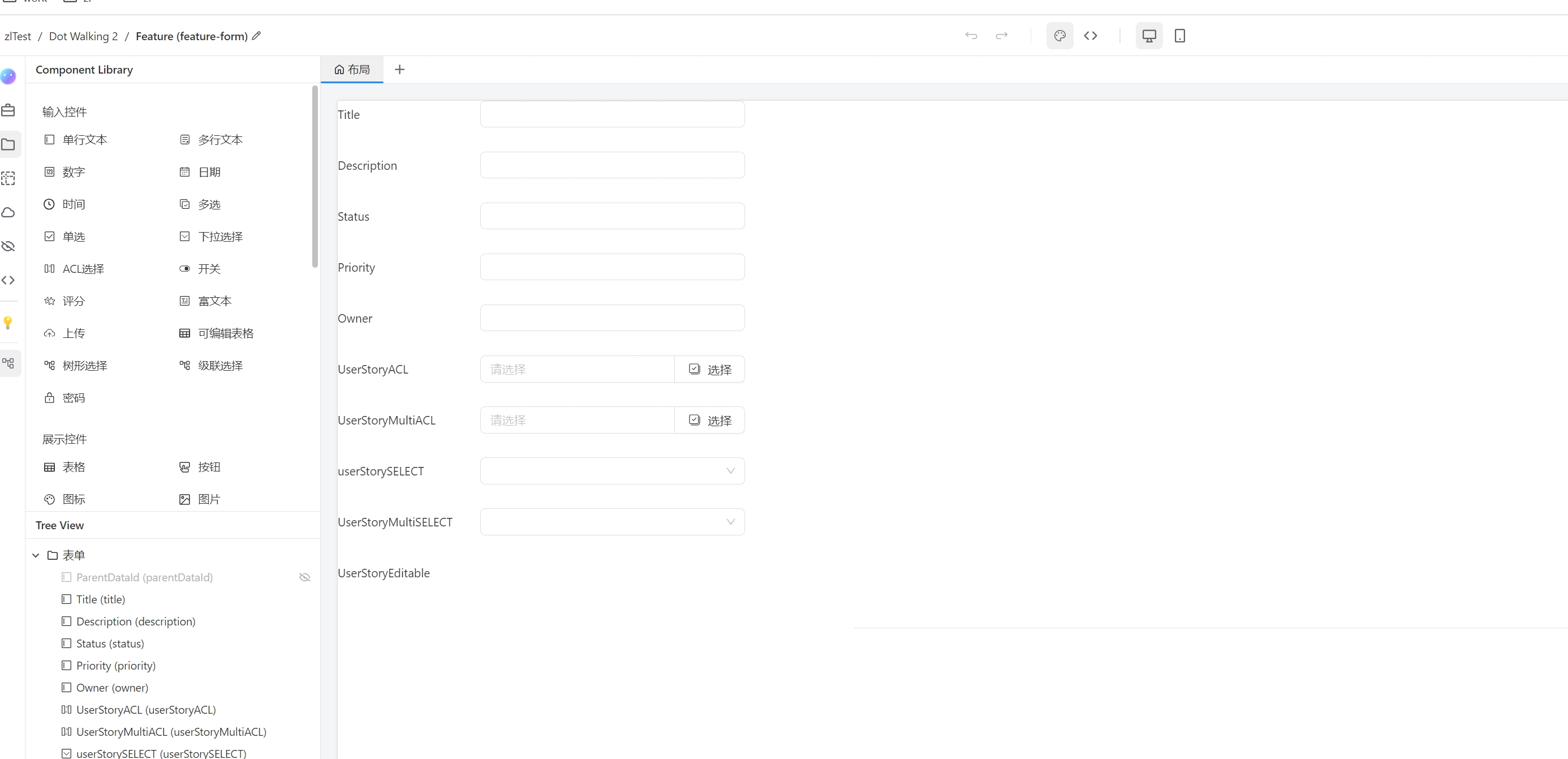
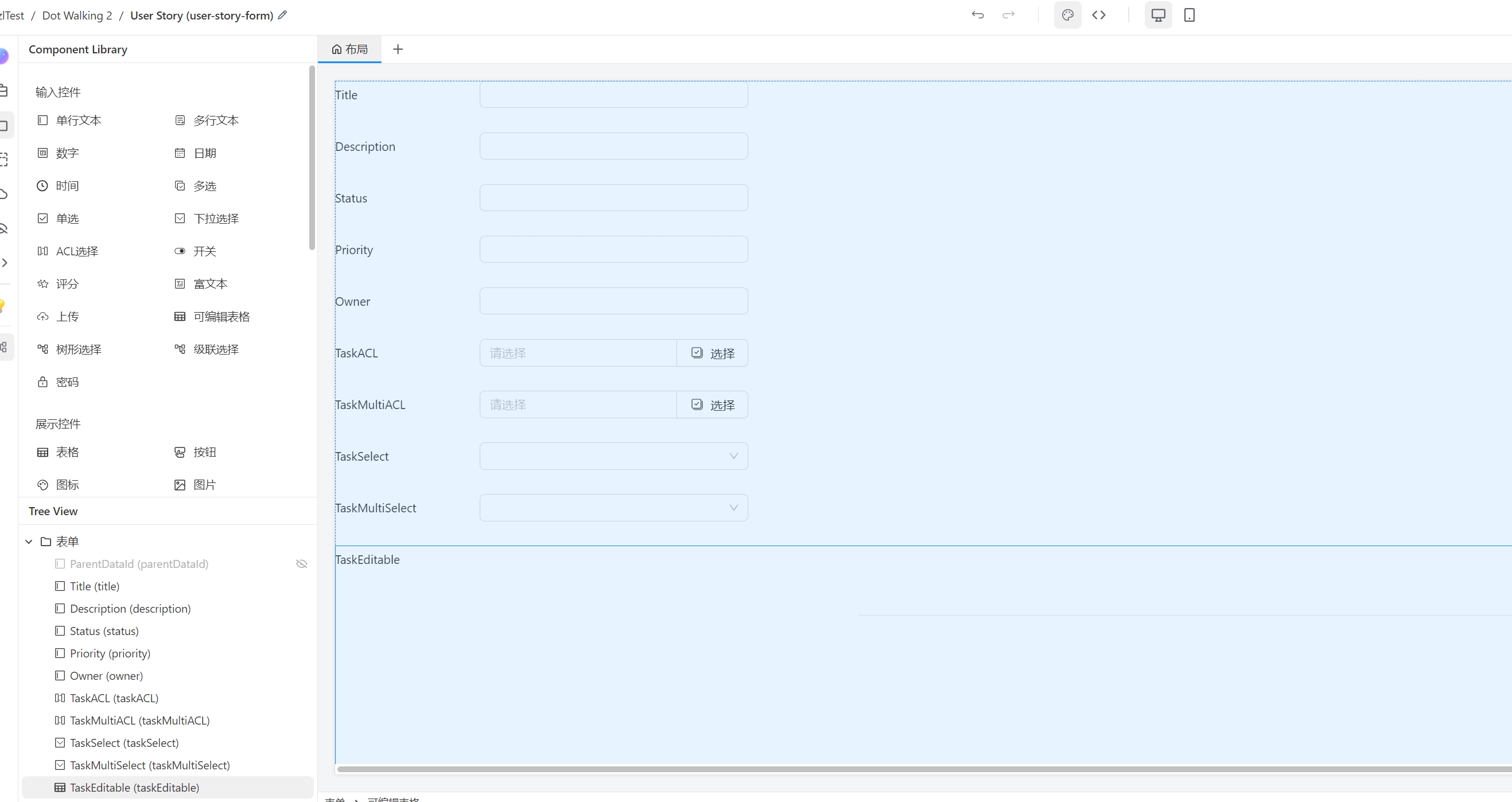
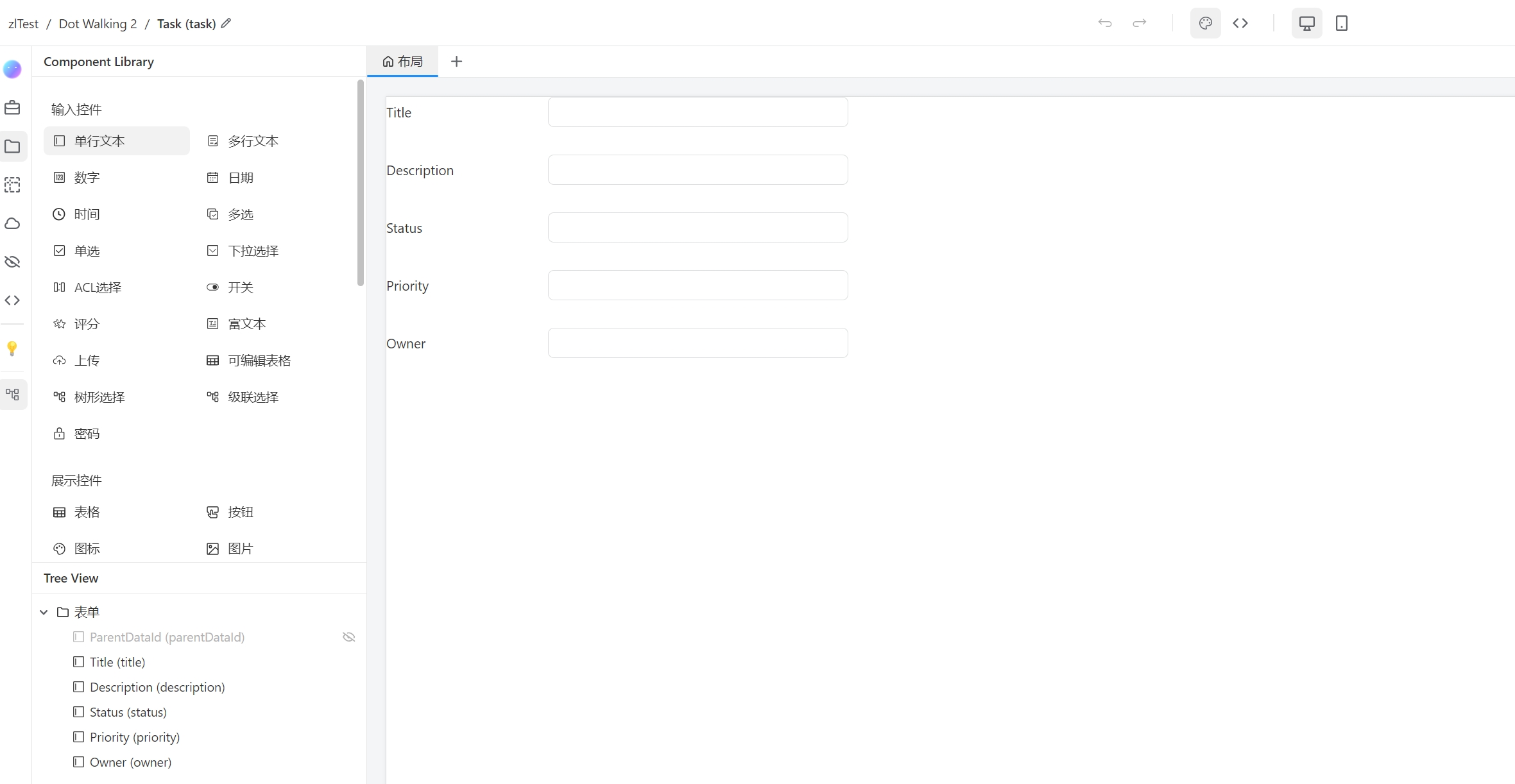
The following examples will be based on these four forms. Each form has field names identical to their tokens, except that the first letter of the tokens is lowercase. For example, the Title field in the Epic form corresponds to the token title.
For field names like ACL, Select, and Editable, the first word indicates the data source, the middle part indicates whether it is multi-select, and the last part indicates the component type. For example:
FeatureACLindicates the data source isFeature, single-select, and the component type isACL.FeatureMultiACLindicates the data source isFeature, multi-select, and the component type isACL.FeatureEditableindicates the data source isFeature, and the component type isEditable.
2.1 Epic
pbcToken:dot-walkingformEntityToken:epic
2.2 Feature
pbcToken:dot-walking formEntityToken:feature
2.3 User Story
pbcToken:dot-walking formEntityToken:userStory
2.4 Task
pbcToken:dot-walking formEntityToken:task
3. Syntax
DW consists of properties (field tokens in formEntity) and functions (such as _filter, _findOne, _resolve). All properties and methods return two types of values:
- DATA: Values related to
formEntityData. - DWR: DW objects (i.e., Dot Walking References).
3.1 InputField Control Types
In the CETA platform, form input controls are divided into two types: reference types and basic types.
3.1.1 引用类型 返回值是DWR
3.1.1 Reference Types (Return DWR)
select (single or multi-select)
acl (single or multi-select)
editable (always multi-select)
3.1.2 Basic Types (Return DATA)
input
number
date
time
upload
checkBox
textArea
radio
switch
rate
3.2 Custom Functions
3.2.1 DW Entry Function _() (Returns DWR)
_(data) is the entry function for Dot Walking scripts. Its parameter data is a Map object containing the following information:
pbcToken(required)formEntityToken(required)id(this is theformEntityDataId, required)
3.2.2 _filter(closure) (Filter Function, Returns DATA)
In Groovy, it is the default parameter name for closures, representing the individual element being passed to the closure. For the _filter(closure) function, closure is a closure, and it represents the current element formEntityData in the collection. You can directly operate on the fields of formEntityData after it and use operators like &&, ||, ! to combine each operation for convenient conditional judgment and filtering.
The following table shows examples of _filter only. For brevity and clarity, the preceding part is:
_(["pbcToken":"dot-walking","formEntityToken":"epic","id":200821]).featureMultiACL.
This represents finding the record with id 200821 in the Epic table's featureMultiACL and filtering the features that meet the _filter conditions.
| Operator | Description | Parameter | InputField Control Type | Example |
|---|---|---|---|---|
== | Equals | None | Basic Types | _filter{it.title == 'Dot Walking'} (feature's title equals "Dot Walking") |
!= | Not Equals | None | Basic Types | _filter{it.title != 'Dot Walking'} (feature's title does not equal "Dot Walking") |
> | Greater Than | None | Basic Types | _filter{it.priority > 5} (feature's priority is greater than 5) |
< | Less Than | None | Basic Types | _filter{it.priority < 5} (feature's priority is less than 5) |
>= | Greater Than or Equal | None | Basic Types | _filter{it.priority >= 5} (feature's priority is greater than or equal to 5) |
<= | Less Than or Equal | None | Basic Types | _filter{it.priority <= 5} (feature's priority is less than or equal to 5) |
_contains(condition) | Contains | String | Basic Types | _filter{it.title._contains("Dot")} (feature's title contains "Dot") |
_notContains(condition) | Does Not Contain | String | Basic Types | _filter{it.title._notContains("Dot")} (feature's title does not contain "Dot") |
_in(List<condition>) | In | Array[String] | Basic Types | _filter{it.priority._in(5, 6, 7)} (feature's priority is 5, 6, or 7) |
_between(condition1, condition2) | Between | Number1, Number2 | Basic Types | _filter{it.priority._between(5, 7)} (feature's priority is greater than 5 and less than 7) |
_startsWith(condition1) | Starts With | String | Basic Types | _filter{it.title._startsWith("Dot")} (feature's title starts with "Dot") |
_endsWith(condition1) | Ends With | String | Basic Types | _filter{it.title._endsWith("Dot")} (feature's title ends with "Dot") |
_blank() | Is Blank | None | Basic Types | _filter{it.title._blank()} (feature's title is blank) |
_notBlank() | Is Not Blank | None | Basic Types | _filter{it.title._notBlank()} (feature's title is not blank) |
_exists() | Exists | Closure | Reference Types | _filter{it.userStory._exists{it.owner == "Bot"}} (feature has a user story where the owner is "Bot") |
_notExists() | Does Not Exist | Closure | Reference Types | _filter{it.userStory._notExists{it.owner == "Bot"}} (feature does not have a user story where the owner is "Bot") |
3.2.2.1 Example 1:
To query the featureACL of the Epic record with ID 200821, the following conditions must be met:
- The
titlefield of thefeaturetable equals "Dot Walking". - The
statusfield of thefeaturetable is not blank. - The
userStoryACLfield exists, and:- The
titlefield of theuserStorytable starts with "DOT" or ends with "WALKING".
- The
_([pbcToken: "dot-walking", formEntityToken: "epic", id: 200821]).featureACL._filter {
    it.title == "Dot Walking" &&
    it.status._notBlank() &&
    it.userStoryACL._exists {
        it.title._startsWith("DOT") || it.title._endsWith("WALKING")
    }
}
3.2.3 _findOne(closure) (Find One, Returns DWR)
This function is similar to _filter, but with the following differences:
- The return value is DWR.
- If multiple results are found, an error will be thrown.
- If no result is found, it returns
null(for basic types) or[](for reference types). - It is expected to find one result.
3.2.4 _resolve() (Resolve, Returns DATA)
Returns the formEntityData collection of the property that calls _resolve().
3.3 Syntax Rules
The DW call chain consists of properties and functions connected by .:
- The
_()function can only callinputFieldproperties. - If the property is of basic type, the call ends, and DATA is returned.
- If it is a multi-select reference type, you can call functions like
_filter(closure),_resolve(),_findOne(closure):- After calling
_filter(closure)or_resolve(), the call ends, and DATA is returned. - After calling
_findOne(closure), you can continue to call theinputFieldproperty of the associated data source and repeat step 2.
- After calling
- If it is a single-select reference type, you can continue to call the
inputFieldproperty of the associated data source or_resolve(), then repeat step 2.
3.4 Examples
All examples below use the following data: ["pbcToken": "dot-walking", "formEntityToken": "epic", "id": 200821].
3.4.1 Example 1:
Retrieve all userStoryMultiACL associated with the featureACL from the Epic record (ID 200821).
_(data).featureACL.userStoryMultiACL._resolve()
3.4.2 Example 2:
To query the featureMultiACL of the Epic record with ID 200821 and filter records with title equal to "Dot Walking", then retrieve all userStoryMultiACL, follow these steps:
- Find
featureMultiACLin the Epic record (ID 200821). - Use
_findOneto filter items withtitleequal to "Dot Walking". - Retrieve all
userStoryMultiACLfrom the filtered item.
Compared to Example 1, since featureMultiACL is multi-select, _findOne is needed for filtering, while featureACL is single-select and does not require this step.
_(data).featureMultiACL._findOne({ it.title == "Dot Walking" }).userStoryMultiACL._resolve()
3.4.3 Example 3:
To query the featureACL of the Epic record with ID 200821 and retrieve all userStoryMultiACL that meet the following conditions:
- Find all
userStoryMultiACLinfeatureACL. - Filter records in the
userStorytable wheretitleequals "Dot Walking" andstatusequals "Active". - Ensure that
taskMultiACLcontains at least one task where thetitlein thetasktable starts with "DOT" or ends with "WALKING".
This way, you can find all userStoryMultiACL that meet these conditions.
_(data).featureACL.userStoryMultiACL._filter {
    it.title == "Dot Walking" && it.status == "Active" && it.taskMultiACL._exists {
        it.title._startsWith("DOT") || it.title._endsWith("WALKING")
    }
}
3.5 Using in Forms
In Forms, select/acl components support expressions:
3.5.1 Syntax
- In the
select/aclmapping, you can define custom key-value pairs in addition to the defaultlabel, value. - The syntax for value expressions is different from DW expressions and uses the
formEntity.fieldToken.fieldToken..dot notation of the current associated data sourceformEntity. If thefieldTokenis of basic type (3.1.2 Basic Types), the dot notation stops; if it is a reference type (3.1.1 Reference Types), you can continue with the dot notation.
Example:
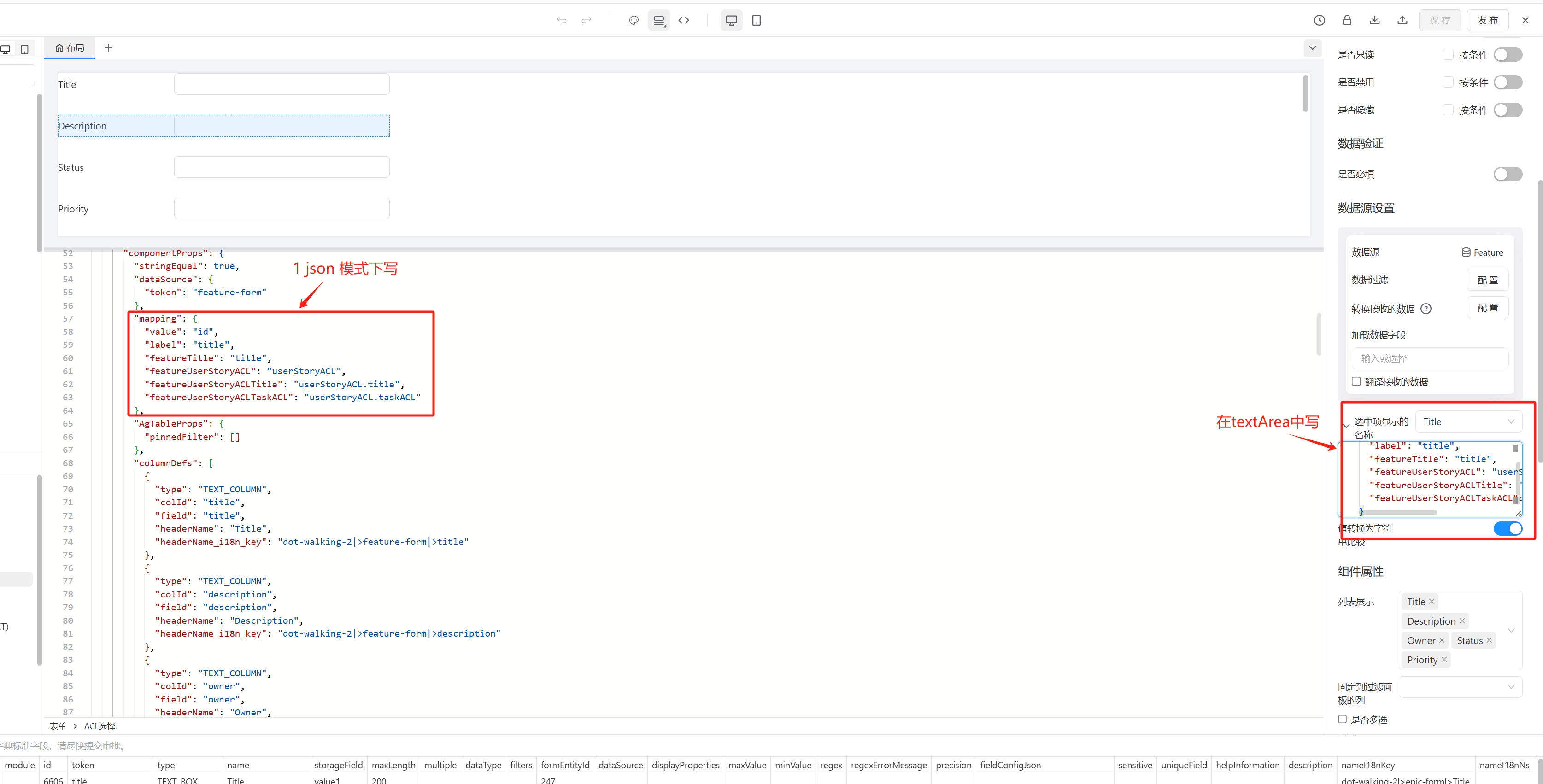
"mapping": {
    "value": "id", // default
    "label": "title", // default
    "featureTitle": "title", // Title field of Feature
    "featureUserStoryACL": "userStoryACL", // userStoryACL field of Feature
    "featureUserStoryACLTitle": "userStoryACL.title", // Title of the associated Story in userStoryACL
    "featureUserStoryACLTaskACL": "userStoryACL.taskACL" // taskACL of the associated Story in userStoryACL
}
3.5.2 Usage
- You can write expressions in JSON mode or in the text area of the associated data source of the
select/aclcomponent.