JavaScript Coding Specification
0 About ES5
JavaScript code in the form designer runs directly in the browser. If you are unsure about browser support, using ES5 syntax is the safest approach.
-
0.1
recommendedVariable declaration in ES5.Use
varfor declaration:// good
var foo = 'foo';Note that variables declared with
varare not block-scoped but function-scoped:// This will print 2, 2, 2, not 0, 1, 2
for (var i = 0; i < 3; ++i) {
var iteration = i;
setTimeout(function() { console.log(iteration); }, i * 1000);
}Additionally, variables declared with
varare hoisted to the top of their scope:// Variables are hoisted to the top of the function, but assignments are not
function example() {
console.log(declaredButNotAssigned); // => undefined
console.log(notDeclared); // => throws a ReferenceError
var declaredButNotAssigned = true;
}Even so, we still recommend declaring variables before using them to enhance readability. Of course, if you are concerned that hoisting may introduce issues, you can also declare all variables at the beginning of the scope.
Do not use variables before declaration, as this can be confusing and risky. eslint: https://eslint.org/docs/rules/no-use-before-define.html
// bad
console.log(foo); // => undefined
var foo = 'foo';
// good
var foo = 'foo';
console.log(foo); // => foo -
0.2
referencedUse theslicemethod of Array for array copying and converting array-like objects.Array copying:
var items = [1, 2, 3];

// bad
var itemsCopy = [];
for (var i = 0; i < items.length; i++) {
  itemsCopy[i] = items[i];
}

// good
var itemsCopy = items.slice();
Converting array-like objects to arrays:
function trigger() {
  var args = Array.prototype.slice.call(arguments);
  // ...
} -
0.3
recommendedDo not use reserved keywords as object property names.Avoid using reserved keywords as object property names, as they do not work in IE8.
// bad
var superman = {
  class: 'alien',
  default: { clark: 'kent' },
  private: true
};

// good
var superman = {
  type: 'alien',
  defaults: { clark: 'kent' },
  hidden: true
};
1 Coding Style
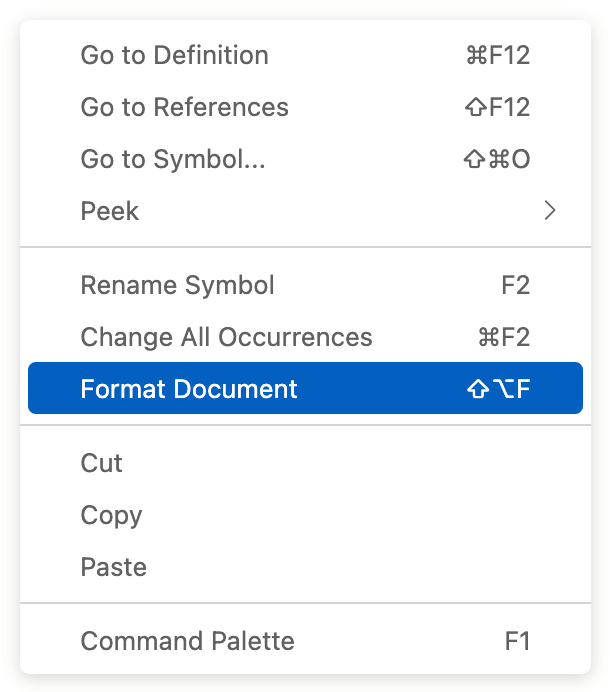
The coding style system already includes formatting specifications. After writing code, right-click to format (Format Document).
As shown below:
2 Language Features
2.1 Variable Declaration
-
2.1.1
mandatoryDeclare one variable per statement. eslint: one-varThis makes it easier to add new declaration statements (you don't have to change the last
;to,every time), and it also aids in single-step debugging.// bad
const foo = 1,
bar = 2;
// good
const foo = 1;
const bar = 2; -
2.1.2
mandatoryDeclared variables must be used. eslint: no-unused-varsUnused variables and expressions can introduce potential issues and confuse maintainers. They should be removed.
// bad - Unused variable `foo`
const foo = 1;

// good
const foo = 1;
doSomethingWith(foo);

// bad - Modifying a variable alone does not count as usage
let bar = 1;
bar = 2;
bar += 1;

// good
let bar = 1;
bar = 2;
bar += 1;
doSomethingWith(bar);

// bad - Unused parameter `y`
function getX(x, y) {
  return x;
}

// good
function getXPlusY(x, y) {
  return x + y;
} -
2.1.3
referencedDeclare variables where they are used.Declare variables just before they are used, rather than at the beginning of the block.
ES6's
letandconstare block-scoped and do not have the hoisting issue likevar. Therefore, we can declare them in a more logical place (generally just before they are used), rather than at the beginning of the block.// bad - If the permission check (checkUserPermission) fails, fetchData is unnecessary
function getData(id) {
const data = fetchData(id);
if (!checkUserPermission()) {
return false;
}
if (data.foo === 'bar') {
// ...
}
return data;
}
// good
function getData(id) {
if (!checkUserPermission()) {
return false;
}
const data = fetchData(id);
if (data.foo === 'bar') {
// ...
}
return data;
} -
2.1.4
mandatoryDo not use variable names that shadow outer scope variables. eslint: no-shadowUsing the same variable name as an existing outer scope variable reduces readability and prevents the inner scope from accessing the outer scope's variable with the same name.
// bad
const foo = 1;
if (someCondition) {
  const foo = 2;
  console.log(foo); // => 2
}

// good
const foo = 1;
if (someCondition) {
  const bar = 2;
  console.log(bar); // => 2
  console.log(foo); // => 1
} -
2.1.5
mandatoryDo not redeclare variables and functions. eslint: no-redeclareIn ES5, although redeclaring with
vardoes not throw an error, it can be confusing and reduce the maintainability of the code. Similarly, function declarations should not have the same name as existing variables and functions:// bad
var a = 'foo';
var a = 'bar';
function a() {}
console.log(a); // => 'bar'
// good
var a = 'foo';
var b = 'bar';
function c() {}
console.log(a); // => 'foo'
// bad - `arg` is already declared as a function parameter
function myFunc(arg) {
var arg = 'foo';
console.log(arg);
}
myFunc('bar'); // => 'foo'
// good
function myFunc(arg) {
var otherName = 'foo';
console.log(arg);
}
myFunc('bar'); // => 'bar'In ES6, redeclaring variables with
constorletwill directly throw an error:// bad
const a = 'foo';
function a() {} // => Uncaught SyntaxError: Identifier 'a' has already been declared
// good
const a = 'foo';
function b() {}
// bad - `arg` is already declared as a function parameter
function myFunc(arg) {
const arg = 'foo';
console.log(arg);
}
myFunc('bar'); // => Uncaught SyntaxError: Identifier 'arg' has already been declared
// good
function myFunc(arg) {
const otherName = 'foo';
console.log(arg);
}
myFunc('bar'); // => 'bar'
2.2 Primitive Types
JavaScript has 7 primitive types: Boolean, Null, Undefined, Number, String, Symbol (introduced in ES6), BigInt (introduced in ES11), and Object type. Learn more. This section mainly discusses conventions related to primitive types.
-
2.2.1
mandatoryDo not usenew Number/String/Boolean. eslint: no-new-wrappersUsing
new Number/String/Booleanfor declaration offers no benefits and can cause variables to becomeobjecttype, potentially introducing bugs.// bad
const num = new Number(0);
const str = new String('foo');
const bool = new Boolean(false);
console.log(typeof num, typeof str, typeof bool); // => object, object, object
if (num) { // true (objects are truthy)
}
if (bool) { // true (objects are truthy)
}
// good
const num = 0;
const str = 'foo';
const bool = false;
console.log(typeof num, typeof str, typeof bool); // => number, string, boolean
if (num) { // false (0 is falsy)
}
if (bool) { // false
} -
2.2.2
recommendedType conversion.Numbers: Use
Number()orparseInt():const str = '1';
// bad
const num = +str;
const num = str >> 0;
const num = new Number(str);
// good
const num = Number(str);
// good
const num = parseInt(str, 10);Strings: Use
String():const num = 1;
// bad
const str = new String(num); // typeof str is "object" not "string"
const str = num + ''; // invokes num.valueOf()
const str = num.toString(); // isn't guaranteed to return a string
// good
const str = String(num);Booleans: Use
!!:const age = 0;
// bad
const hasAge = new Boolean(age);
const hasAge = Boolean(age);
// good
const hasAge = !!age; -
2.2.3
recommendedAlways specify the radix when usingparseInt(). eslint: radixThe
parseIntmethod takes two parameters: the string to be converted and the radix. If the second parameter is omitted,parseIntwill automatically determine the radix based on the first parameter:- If it starts with
0x, it uses 16 as the radix. - If it starts with
0, it uses 8 as the radix. This rule often causes errors and was removed in ES5, meaning that ES5 and later execution environments use 10 as the radix for strings starting with0. - In other cases, it uses 10 as the radix.
Although ES5 removed the rule of using 8 as the radix, it is sometimes difficult to ensure that all browsers and JavaScript execution environments support this feature. Learn more
Therefore, we recommend always specifying the radix for the
parseInt()method, unless you can guarantee that the execution environment of the code is not affected by the above characteristics.// bad
parseInt("071"); // => ES5 and earlier execution environments return 57
// good
parseInt("071", 10); // => 71 - If it starts with
-
2.2.4
mandatoryAvoid unnecessary boolean casts. eslint: no-extra-boolean-castCasting expressions to booleans in
ifand other conditional statements is redundant:// bad
if (!!foo) {
// ...
}
while (!!foo) {
// ...
}
const a = !!flag ? b : c;
// good
if (foo) {
// ...
}
while (foo) {
// ...
}
const a = flag ? b : c; -
2.2.5 Strings
-
2.2.5.1
mandatoryUse single quotes for strings. eslint: quotes// bad
const name = "tod";
const name = `tod`; // Template strings should contain variables or line breaks; otherwise, use single quotes.
// good
const name = 'tod'; -
2.2.5.2
recommendedUse template strings instead of string concatenation. eslint: prefer-templateTemplate strings make the code more concise and readable.
// bad
function getDisplayName({ nickName, realName }) {
  return nickName + ' (' + realName + ')';
}

// good
function getDisplayName({ nickName, realName }) {
  return `${nickName} (${realName})`;
} -
2.2.5.3
mandatoryAvoid unnecessary escape characters. no-useless-escapeEscape characters can greatly reduce code readability, so avoid using them unnecessarily.
// bad
const foo = '\'this\' \i\s \"quoted\"';

// good
const foo = '\'this\' is "quoted"';
const foo = `'this' is "quoted"`;
2.3 Arrays
-
2.3.1
mandatoryUse literals to create arrays. eslint: no-array-constructorDo not use
new Array()andArray()to create arrays, unless you are constructing an empty array of a certain length.// bad
const a = new Array(1, 2, 3);
const b = Array(1, 2, 3);
// good
const a = [1, 2, 3];
const b = new Array(500); // Constructing an empty array of length 500 -
2.3.2
mandatoryCallback functions in certain array methods must contain areturnstatement. eslint: array-callback-returnThe following array methods must contain a
returnstatement in their callback functions:map,filter,from,every,find,findIndex,reduce,reduceRight,some,sort. Otherwise, misuse or errors may occur.A common misuse is using
mapwhenforEachshould be used:// Desired outcome: Convert ['a', 'b', 'c'] to {a: 0, b: 1, c: 2}
const myArray = ['a', 'b', 'c'];
const myObj = {};
// bad - `map` is used for building a new array; use `forEach` for simple iteration
myArray.map((item, index) => {
myObj[item] = index;
});
// good
myArray.forEach((item, index) => {
myObj[item] = index;
});Omitting
returnin certain methods can also cause errors:// Desired outcome: Convert ['a', 'b', 'c'] to {a: 0, b: 1, c: 2}
const myArray = ['a', 'b', 'c'];
// bad => Uncaught TypeError: Cannot set property 'b' of undefined
const myObj = myArray.reduce((memo, item, index) => {
memo[item] = index;
}, {});
// good
const myObj = myArray.reduce((memo, item, index) => {
memo[item] = index;
return memo;
}, {});
2.4 Objects
-
2.4.1
mandatoryUse literals to create objects. eslint: no-new-object// bad
const obj = new Object();
// good
const obj = {}; -
2.4.2
mandatoryDo not quote property names in objects unless they contain special characters. eslint: quote-propsThis makes the code more concise and helps with syntax highlighting and optimizations in some JavaScript engines.
// bad
const bad = {
  'foo': 3,
  'bar': 4,
  'data-blah': 5,
  'one two': 12,
};

// good
const good = {
  foo: 3,
  bar: 4,
  'data-blah': 5,
  'one two': 12,
}; -
2.4.3
mandatoryPrefer using dot notation to access object properties. eslint: dot-notationThis improves code readability.
[]should only be used when accessing dynamic property names or properties containing special characters.const obj = {
active: true,
[getDynamicKey()]: 'foo',
'data-bar': 'bar',
};
// bad
const isActive = obj['active'];
// good
const isActive = obj.active;
const foo = obj[getDynamicKey()];
const bar = obj['data-bar']; -
2.4.4
mandatoryDo not directly call methods onObject.prototypeon objects. eslint: no-prototype-builtinsDo not directly call methods on
Object.prototypeon objects, such ashasOwnProperty,propertyIsEnumerable,isPrototypeOf.These methods can be overridden by properties on the object, leading to errors:
JavaScript复制
const obj = {
  foo: 'foo',
  hasOwnProperty: false,
};
const objNull = Object.create(null);

// bad => Uncaught TypeError: obj.hasOwnProperty is not a function
console.log(obj.hasOwnProperty('foo'));
console.log(objNull.hasOwnProperty('foo'));

// good
console.log(Object.prototype.hasOwnProperty.call(obj, 'foo'));
console.log(Object.prototype.hasOwnProperty.call(objNull, 'foo'));
2.5 Functions
-
2.5.1
mandatoryDo not use function declarations in blocks. eslint: no-inner-declarationsFunction declarations should not be used inside non-function blocks (such as
if,while, etc.):// bad - Function declarations are not block-scoped but function-scoped, which can lead to misunderstandings as the function is accessible outside the block
if (true) {
function test() {
console.log('test');
}
}
test(); // => 'test'
// good - Function expressions clearly indicate whether the function can be used outside the block
// Cannot be used outside the block
if (true) {
const test = function () {
console.log('test');
};
}
test(); // => Uncaught ReferenceError: test is not defined
// Can be used outside the block
let test;
if (true) {
test = function () {
console.log('test');
};
}
test(); // => 'test' -
2.5.2
recommendedDo not modify function parameters. eslint: no-param-reassignDo not modify parameters of reference types, as this can cause the original variable passed as an argument to change:
// bad
const f1 = function f1(obj) {
  obj.key = 1;
}
const originalObj = { key: 0 };
f1(originalObj);
console.log(originalObj); // => { key: 1 }

// good
const f2 = function f2(obj) {
  const key = Object.prototype.hasOwnProperty.call(obj, 'key') ? obj.key : 1;
}
Also, do not reassign parameters, as this can lead to unexpected behavior and optimization issues:
// bad
function foo(bar, baz) {
  if (!baz) {
    bar = 1;
  }
}

// good
function foo(bar, baz) {
  let qux = bar;
  if (!baz) {
    qux = 1;
  }
} -
2.5.3
mandatoryWrap immediately invoked function expressions (IIFE) in parentheses. eslint: wrap-iifeAn IIFE is a self-contained execution unit, and wrapping it in parentheses clearly indicates this. Note that with the introduction of ES6 module syntax, you may no longer need to use IIFE.
(function () {
  console.log('Welcome to the Internet. Please follow me.');
}()); -
2.5.4
referencedThe complexity of functions should not be too high. eslint: complexityHigh complexity means that the code is difficult to maintain and test. We recommend that the complexity of functions does not exceed the following thresholds:
- Cyclomatic complexity should not exceed 10
- Cognitive complexity should not exceed 15
2.6 Operators
-
2.6.1
recommendedUse strict equality operators. eslint: eqeqeqThe non-strict equality operators (
==and!=) will convert the values being compared to the same type before comparison, which can be a significant hazard for those unfamiliar with JavaScript's type coercion rules. Learn moreTherefore, in most cases, we should use strict comparison operators (
===and!==) for comparisons. If the values to be compared are of different types, explicitly convert them to the same type before using===for comparison, rather than relying on the implicit type coercion of==and!=.const id = '83949';
// bad - Intentionally using == to compare with a number for compatibility with the possibility that id is a string
if (id == 83949) {
// do something
}
// good - If id might be a string, explicitly convert it to a number before using === for comparison
if (Number(id) === 83949) {
// do something
} -
2.6.2
mandatoryDo not use unary increment/decrement operators. eslint: no-plusplusDo not use unary increment/decrement operators (
++and--), except in the condition offorloops.++and--can introduce understanding costs regarding whether the value will change early, and they can also cause errors due to the automatic semicolon insertion mechanism. Therefore, we recommend usingnum += 1instead ofnum++. However, out of habit, it is still acceptable to use increment/decrement operators in the condition offorloops.let num = 1;
// bad
num++;
--num;
// good
num += 1;
num -= 1; -
2.6.3
mandatoryDo not use thevoidoperator. eslint: no-voidIn older versions of JavaScript, the value
undefinedwas mutable, and thevoidstatement was generally used to obtain anundefinedvalue. In newer versions of JavaScript, this issue no longer exists. Therefore, for the sake of code readability, the use of thevoidoperator is prohibited.// bad
const foo = void 0;
// good
const foo = undefined; -
2.6.4
mandatoryAvoid nested ternary expressions. eslint: no-nested-ternaryNested ternary expressions reduce code readability.
// bad
const foo = bar ? baz : qux === quxx ? bing : bam;

// good
const qu = qux === quxx ? bing : bam;
const foo = bar ? baz : qu; -
2.6.5
mandatoryAvoid unnecessary ternary expressions. eslint: no-unneeded-ternary// bad
const foo = a ? a : b;
const bar = c ? true : false;
const baz = c ? false : true;
// good
const foo = a || b;
const bar = !!c;
const baz = !c; -
2.6.6
mandatoryGroup expressions with parentheses when mixing multiple operators. eslint: no-mixed-operatorsThis can clearly express the intent of the code and improve readability. Arithmetic operators (
+,-,*,/) do not need to be grouped, as most people are familiar with their precedence.// bad
const foo = a && b < 0 || c > 0 || d + 1 === 0;
// good
const foo = (a && b < 0) || c > 0 || (d + 1 === 0);
// bad
const bar = a ** b - 5 % d;
// good
const bar = (a ** b) - (5 % d);
// bad - Someone might mistakenly think the execution order is (a || b) && c
if (a || b && c) {
return d;
}
// good
if (a || (b && c)) {
return d;
}
// good - Arithmetic operations do not need parentheses
const bar = a + b / c * d;
2.7 Control Statements
-
2.7.1
mandatoryCases inswitchstatements must end withbreak. eslint: no-fallthrough// bad
switch(foo) {
case 1:
doSomething();
case 2:
doSomethingElse();
default:
doSomething();
}
// good
switch(foo) {
case 1:
doSomething();
break;
case 2:
doSomethingElse();
break;
default:
doSomething();
} -
2.7.2
recommendedswitchstatements should always include adefaultbranch. eslint: default-caseWhen using
switchstatements, sometimes errors occur because the developer forgets to set adefaultbranch. Therefore, it is recommended to always include adefault. If you intentionally omitdefault, please indicate this at the end of theswitchstatement with a// no defaultcomment:// bad
let foo;
switch (bar) {
case 1:
foo = 2;
break;
}
// good
let foo;
switch (bar) {
case 1:
foo = 2;
break;
default:
foo = 0;
}
// good - If you intentionally omit `default`, indicate this with a `// no default` comment at the end of the `switch` statement
let foo = 0;
switch (bar) {
case 1:
foo = 2;
break;
// no default
} -
2.7.3
referencedswitchstatements should have at least three conditional branches.switchstatements make the code structure clearer when there are many conditional branches. For cases with only one or two conditional branches, it is better to useifstatements, which are easier to write and read.// bad
let foo;
switch (bar) {
case 1:
foo = 2;
break;
default:
foo = 0;
}
// good
let foo;
if (bar === 1) {
foo = 2;
} else {
foo = 0;
} -
2.7.4
referencedThe nesting level of control statements should not be too deep. eslint: max-depthThe nesting level of control statements should not exceed 4 levels, otherwise it will be difficult to read and maintain:
// bad
if (condition1) {
  // depth = 1
  if (condition2) {
    // depth = 2
    for (let i = 0; i < 10; i++) {
      // depth = 3
      if (condition4) {
        // depth = 4
        if (condition5) {
          // bad - depth = 5
        }
        return;
      }
    }
  }
} -
2.7.5
mandatoryThe counter in aforloop should move in the correct direction. eslint: for-directionWhen the counter in a
forloop's update clause moves in the wrong direction, the loop's termination condition will never be reached, leading to an infinite loop. This either indicates a mistake in the program or that theforloop should be changed to awhileloop.// bad
for (let i = 0; i < length; i--) {
// do something
}
// good
for (let i = 0; i < length; i++) {
// do something
} -
2.7.6
recommendedKeys infor-inloops should be validated. eslint: guard-for-inWhen using
for-inloops, it is necessary to avoid iterating over properties inherited from the prototype chain. Therefore, it is safer to validate whether the key is a property of the object itself:// bad
for (const key in foo) {
doSomething(key);
}
// good
for (const key in foo) {
if (Object.prototype.hasOwnProperty.call(foo, key)) {
doSomething(key);
}
} -
2.7.7
referencedIf the result of anifstatement is always areturnstatement, theelsebranch is unnecessary. eslint: no-else-return// bad
function foo() {
if (x) {
return x;
} else {
return y;
}
}
// good
function foo() {
if (x) {
return x;
}
return y;
} -
2.7.8
referencedThe result of a conditional expression.The value of a conditional expression (e.g., the condition in an
ifstatement) is coerced to a boolean value using the abstract methodToBoolean, following these rules:- Objects and arrays are coerced to true
- Undefined is coerced to false
- Null is coerced to false
- Booleans are coerced to their boolean value
- Numbers are coerced to false if they are +0, -0, or NaN, otherwise true
- Strings are coerced to false if they are an empty string
'', otherwise true
if ({}) { // => true
}

if ([]) { // => true
}

if (0) { // => false
}

if ('0') { // => true
}

if ('') { // => false
}
2.8 Others
-
2.8.1
mandatoryDo not useeval. eslint: no-evalThe
evalstatement poses security risks and can lead to injection attacks.// bad
const obj = { x: 'foo' };
const key = 'x';
const value = eval('obj.' + key);
// good
const obj = { x: 'foo' };
const key = 'x';
const value = obj[key]; -
2.8.2
mandatoryDo not usedebugger. eslint: no-debuggerThe
debuggerstatement pauses the program and opens the debugger at that location. It is typically used during debugging and should not be released to production.// bad
function isTruthy(x) {
debugger;
return Boolean(x);
} -
2.8.3
recommendedDo not usealert. eslint: no-alertThe
alertstatement causes the browser to display a native alert box, which can give the impression that your program has encountered an error. If you need to display a warning message to the user, it is better to use a third-party modal component or define your own alert box style. Similarly,confirmandpromptstatements should not be used.// bad
alert('Oops!');
// good - Use a custom Alert component
Alert('Oops!'); -
2.8.4
recommendedDo not useconsolein production. eslint: no-consoleconsolestatements are typically used during debugging and should be removed from the code before releasing to production.// bad
console.log('Some debug messages..'); -
2.8.5
mandatoryDo not assign values to native objects or read-only global objects. eslint: no-global-assignJavaScript execution environments include global variables and native objects, such as
windowin the browser environment,globalandprocessin the Node environment,Object,undefined, etc. In addition to well-known objects likewindow, JavaScript provides hundreds of built-in global objects. You might inadvertently reassign values to them when defining global variables. Therefore, the best practice is to avoid defining global variables.// bad
window = {};
Object = null;
undefined = 1;
3 Comments
Purpose of comments: To improve code readability, thereby enhancing code maintainability Principle of comments: Avoid unnecessary comments; when necessary, be as detailed as possible
-
3.1
recommendedUse//for single-line comments.Comments should be on a separate line above the object being commented on and should not be appended to the end of a statement:
// bad
const active = true;  // is current tab

// good
// is current tab
const active = true;
There should be an empty line above the comment line (unless the comment line is at the top of a block), to increase readability:
// bad - An empty line is needed above the comment line
function getType() {
  console.log('fetching type...');
  // set the default type to 'no type'
  const type = this.type || 'no type';

  return type;
}

// good
function getType() {
  console.log('fetching type...');

  // set the default type to 'no type'
  const type = this.type || 'no type';

  return type;
}

// bad - No empty line is needed if the comment line is at the top of a block
function getType() {

  // set the default type to 'no type'
  const type = this.type || 'no type';

  return type;
}

// good
function getType() {
  // set the default type to 'no type'
  const type = this.type || 'no type';

  return type;
} -
3.2
recommendedUse/** ... */for multi-line comments, not multiple lines of//.// bad
// make() returns a new element
// based on the passed in tag name
function make(tag) {
// ...
return element;
}
// good
/**
* make() returns a new element
* based on the passed-in tag name
*/
function make(tag) {
// ...
return element;
} -
3.3
mandatoryThere should be a space between the comment content and the comment symbol. eslint: spaced-commentThere should be a space between the comment content and the comment symbol to increase readability:
// bad
//is current tab
const active = true;

// good
// is current tab
const active = true;

// bad
/**
 *make() returns a new element
 *based on the passed-in tag name
 */
function make(tag) {
  // ...

  return element;
}

// good
/**
 * make() returns a new element
 * based on the passed-in tag name
 */
function make(tag) {
  // ...

  return element;
} -
3.4
referencedUse special comment tags appropriately. eslint: no-warning-commentsSometimes we find a potential bug but cannot fix it for some reason; or there is some pending functionality in a certain place. In such cases, we need to use special tags to inform ourselves or collaborators in the future. The most commonly used special tags are:
// FIXME: Describe the issue// TODO: Describe what needs to be done or the solution to the problem
An undesirable but common situation is that after we tag code with
FIXMEorTODO, we never find the time to address it. Therefore, if you tag something, you should take responsibility for it and resolve it at some point.class Calculator extends Abacus {
constructor() {
super();
// FIXME: Should not use a global here
total = 0;
// TODO: Total should be configurable via an options parameter
this.total = 0;
}
} -
3.5
referencedUse the jsdoc specification for documentation comments.For documentation comments, such as functions, classes, files, events, etc., it is recommended to use the jsdoc specification or a similar one.
For example:
/**
 * The Book class represents a book.
 * @constructor
 * @param {string} title - The title of the book.
 * @param {string} author - The author of the book.
 */
function Book(title, author) {
  this.title = title;
  this.author = author;
}

Book.prototype = {
  /**
   * Get the title of the book
   * @returns {string|*}
   */
  getTitle() {
    return this.title;
  },

  /**
   * Set the number of pages in the book
   * @param pageNum {number} Number of pages
   */
  setPageNum(pageNum) {
    this.pageNum = pageNum;
  },
}; -
3.6
referencedUnused code comments should be removed immediately.Unused commented-out code can make the program bloated and reduce readability. It should be removed immediately. You can retrieve deleted code through version control systems.
4 Naming Conventions
-
4.1
referencedUse camelCase for naming primitive types, objects, functions, and instances. camelcase// bad
const this_is_my_string = 'foo';
const this_is_my_object = {};
function this_is_my_function() {}
// good
const thisIsMyString = 'foo';
const thisIsMyObject = {};
function thisIsMyFunction() {} -
4.2
mandatoryUse PascalCase for naming classes and constructors. eslint: new-cap// bad
function user(options) {
this.name = options.name;
}
const bad = new user({
name: 'nope',
});
// good
class User {
constructor(options) {
this.name = options.name;
}
}
const good = new User({
name: 'yup',
}); -
4.3
referencedNames should not start or end with underscores. eslint: no-underscore-dangleJavaScript does not have the concept of private properties or methods, and such naming can be misleading.
// bad
this.__firstName__ = 'Panda';
this.firstName_ = 'Panda';
this._firstName = 'Panda';

// good
this.firstName = 'Panda';